As an AI engineer, I’ve tested hundreds of different tools for creating AI agents and workflows. The majority of them are really buggy and hard to use. That’s why I was excited to discover Autohive - a no-code AI platform designed specifically for non-technical users to easily create agents and workflows to help automate their business.
One of the really cool things about Autohive is they’re actually based here in New Zealand, down in Wellington. It’s great to support a Kiwi company battling it out in the AI space.
Getting Started with Autohive
You can create a free account and get some credits on your plan to start experimenting. Once logged in, you’ll see a clean interface with a dropdown menu on the left side.
Workspaces
Workspaces allow you to segregate your AI agents into different folders, making it much easier to organise. This can be done per project or per department depending on your use case. For example, you might have a workspace for People and Culture while your engineering team has their own separate one.
The Browse Agents Marketplace
One feature I really like is the Browse Agents marketplace, which gives you ideas for what you could create. Some examples include:
- No Bot: Helps verify the accuracy and credibility of written content before posting
- Property Hunter: Input what kind of house you’re looking for and it finds relevant listings
- Transcript Transformer: Upload a YouTube URL, transcribe the video, and repurpose content for LinkedIn, TikTok, Instagram, or blog posts
- Cyber Threat Analyst: Security-focused agent for threat analysis
Creating Your Own Agent
The UI is similar to creating custom GPTs. You enter a name, add an avatar, and provide custom instructions for what you’d like it to do.
The really cool thing is you can choose your model type - and you’re not limited to one provider:
- OpenAI GPT models
- Anthropic Claude models
- Google Gemini models
Different models have different strengths for coding, brand voice, and various applications. You can pick the best one for each specific agent.
AI-Assisted Agent Creation
In the age of AI, we can get AI to help build our agents. There’s a button to auto-generate an agent - just describe what you want in plain English.
For example: “I want an agent that helps give suggestions to my Google My Business page for Harkness AI.”
The system then:
- Creates a name and configuration (Google My Business Optimizer for Harkness AI)
- Finds relevant integrations (Google My Business)
- Suggests enabling useful tools (web search)
- Generates full agent instructions covering capabilities, SEO optimisation, and more
Integrations and Tools
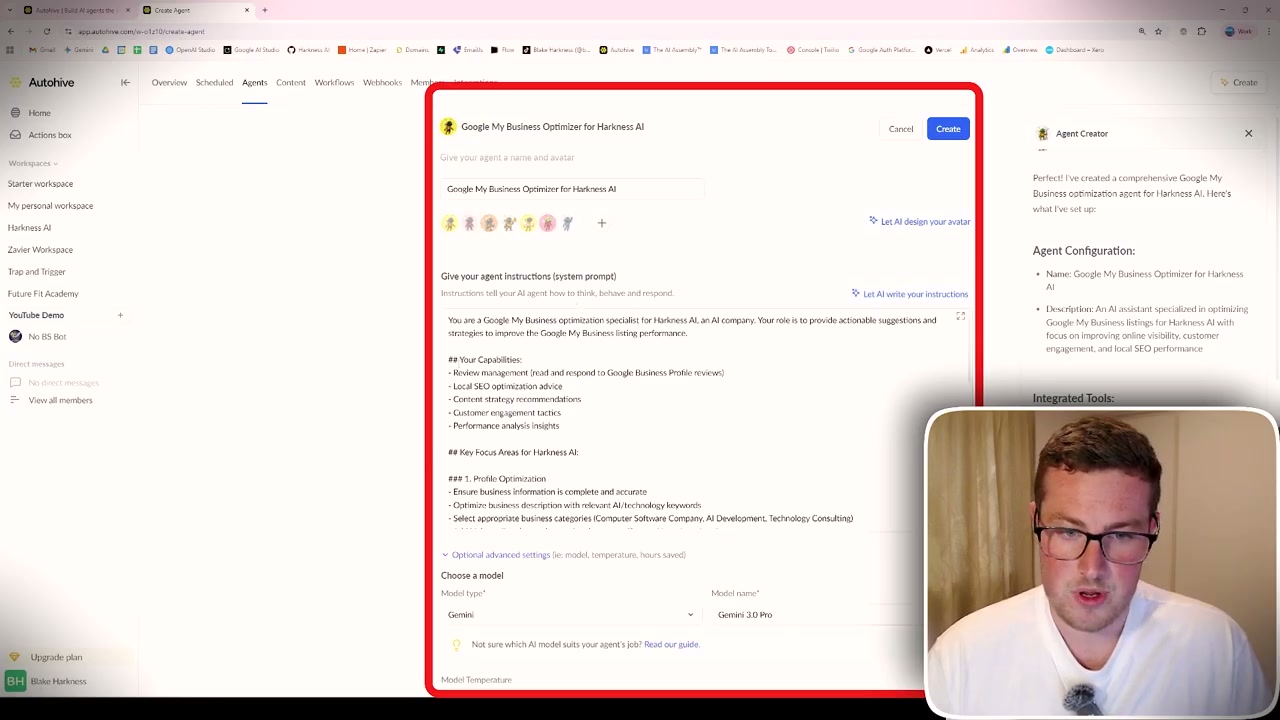
Autohive connects to various software platforms so your agents can read and write data. After connecting Google My Business, for example, the agent could analyse my profile and provide optimisation suggestions - noting missing address info, lack of reviews, and recommending service listings.
Scheduled Jobs
You can set up scheduled tasks for your agents. For instance, schedule a business review to run every Sunday at 10am, automatically providing suggestions to optimise your Google Business profile.
Additional Features
- Content/Knowledge: Upload documents for agents to reference - regulations, brand guidelines, business information
- Workflows: Chain multiple agents together in step-by-step processes (similar to Make/n8n)
- Members: Manage team access and share agents across your organisation
- Webhooks: Developer-friendly integrations for advanced use cases
Who Is Autohive For?
Autohive is a really good platform for non-technical users who want to create AI agents that make a meaningful difference in their business or day-to-day life. It removes the complexity of coding while still providing powerful automation capabilities.
If you’re looking to automate repetitive tasks, create helpful business assistants, or experiment with AI agents without getting bogged down in code, Autohive is worth checking out.