Note: This is not financial advice - it’s a tool to help interpret official IRD guidance.
Recently, I started working as a sole trader on top of my day job, which means I’ve had to learn a whole lot about tax deductions and what the IRD actually wants from me. If you’ve ever tried to make sense of the official IRD guides, you’ll know they’re packed with information but spread across dozens of pages and not exactly easy to digest.
That’s where AI comes in. It’s designed to synthesise large volumes of information and surface the key answers you’re actually looking for.
What the Chatbot Can Do
If you ask it how to calculate your home office expenses when you use one room for work and split bills with your flatmates, it walks through the full process: identifying the business use area, applying the business use percentage to shared costs, splitting the bills first, and keeping good records. It also provides the source of where it found the information, which is useful for fact-checking.
Gathering the IRD Documents
The first step was going to the official IRD website and downloading their public-facing forms and guides as PDFs. I collected seven documents most relevant to my situation:
- Individual income tax return
- Smart business guide
- GST guide
- General depreciation rates
- Depreciation guide
- Tax administration act
- Income act
Some of these documents have nearly 4,800 pages. Synthesising all of that is a huge time-saver compared to reading through everything manually.
Why Custom Documents Matter
If you just asked the normal ChatGPT about New Zealand tax, it might blend information that’s either outdated or not NZ-specific. By uploading specific IRD documents, the chatbot references only those knowledge sources and ignores potentially incorrect information from its general training data.
Building the Custom GPT
Head over to chatgpt.com and go to the “Explore GPTs” page. Click “Create” in the top right to start a blank custom GPT. The two most important parts are:
1. System Instructions
The system prompt tells the chatbot how to behave. Mine says it’s a reliable, knowledgeable AI assistant trained on New Zealand tax law from IRD guidance. It must only use direct excerpts or clear summaries from the sources, cite where information comes from, and clearly state when it cannot answer based on the available documentation.
2. Knowledge Upload
This is where you upload the actual IRD documents. Select all your PDFs and load them into the agent. I also turned off web search to prevent it from looking at potentially incorrect websites, since we’ve already provided the authoritative documents.
Testing the Results
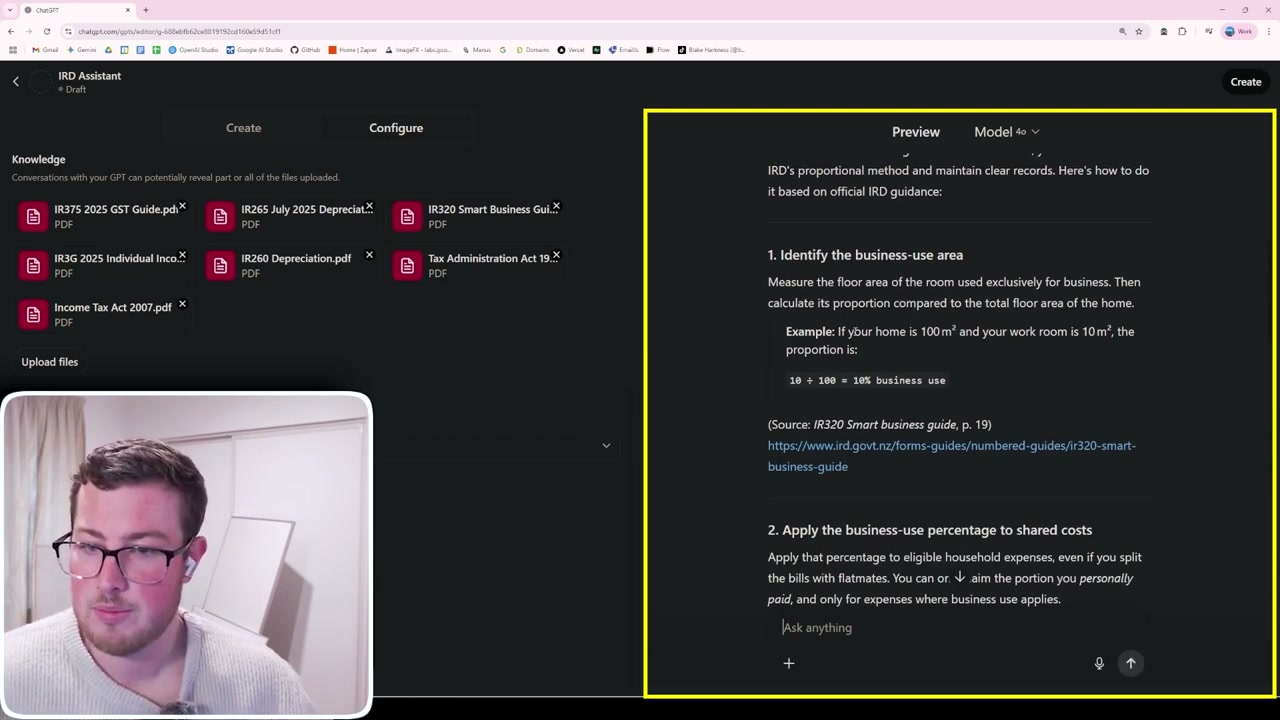
When asked about home office expenses, it correctly outlined the steps: determine business use area percentage, apply it to shared costs after splitting with flatmates, and keep records of floor plans, utility bills, and work logs. It provided the source document and page number for fact-checking.
For a question about laptop depreciation for mixed business and personal use, it correctly explained determining the business use percentage, choosing between diminishing value or straight-line depreciation methods, and calculating annual depreciation.
Important Caveat
This tool is not a replacement for a registered accountant. It purely synthesises publicly available IRD information and guides. For any actual financial advice, you should consult a tax professional. If you want AI working on your own numbers rather than general guidance, connecting Claude to your books is the next step - the Claude and Xero guides cover how, and where the limits are.