Site Safety: Claude set up across six parts of the week in 2 hours
Site Safety, a temporary fencing hire business running from South Auckland to Whangarei, now has Claude drafting its invoices, bookings, email replies and lead briefs for the owner to sign off, after one 2-hour setup session.

- Client
- Site Safety Ltd
- Industry
- Temporary fencing hire
- Location
- South Auckland to Whangarei
- What we did
- Claude setup, custom skills and hands-on training
The setup in numbers
- 2 hoursto set Claude up with the owner, in one session
- 6parts of the week Claude was set up to handle
- 5custom skills, including invoices, bookings and lead research
- Draft onlynothing is sent or approved without the owner
The short version
- The owner runs Site Safety's fence jobs on the road most days, so hire invoices, bookings buried in email and new leads all waited until he got back to a desk.
- In one 2-hour session we loaded Claude with how the business runs, set it up across six parts of his week and added five custom skills, including invoices, bookings and lead research.
- The owner confirmed it working in June 2026: Claude does the drafting, and nothing is sent or approved without him.
The problem
The owner was on the road, so the admin waited for him
Site Safety's owner is on the road most days running fence jobs. The admin waits for him: hire invoices that are last month's with small changes, bookings buried in email, and new leads to research.
He found us through a LinkedIn post on connecting Claude to Xero. He wanted Claude doing the drafting, at his desk or on his phone.
The solution
Claude was set up across six parts of the owner's week
- Know the business: fencing hire, the run from South Auckland to Whangarei, and the way the owner words things
- Draft hire invoices in Xero, including last month's duplicated for a new period
- Put job bookings in the calendar in his own format, and flag clashes
- Read and summarise email, and draft the replies
- Research a new lead into a one-page brief with cold email and cold call angles
- Take a job down by voice in the phone app while he is on the road
Claude drafts every job, and the owner makes every call
- The owner asksTyped or spoken, at his desk or in the phone app.
- Claude picks it upIt knows his formats, his area and when to ask first.
- Claude checks the factsPast invoices in Xero, the calendar for clashes, public sources for leads.
- A draft comes backAn invoice in draft, a proposed booking or a lead brief.
- The owner decidesHe checks it, changes what he wants, then sends or saves.
Claude drafts. The owner decides.
A monthly hire invoice now takes one sentence
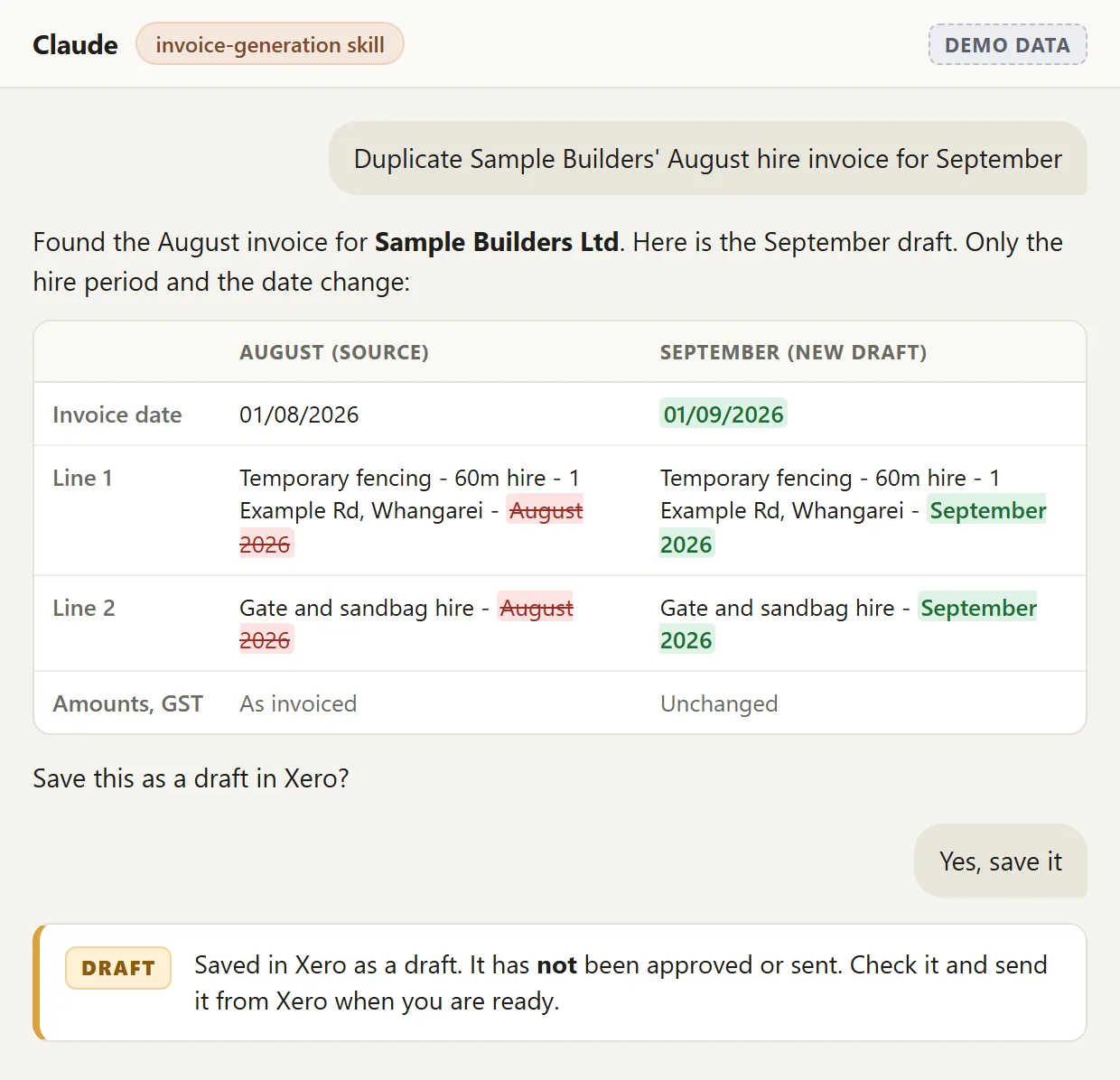
A lot of Site Safety's invoices are monthly hire: last month's invoice with a new period. The owner asks Claude to duplicate it, and the skill copies the lines, updates the dates and shows exactly what changed.
Everything stays a draft in Xero. Claude never approves or sends an invoice, and it will not touch one that has already gone out.
Every new lead gets a one-page brief before the first call
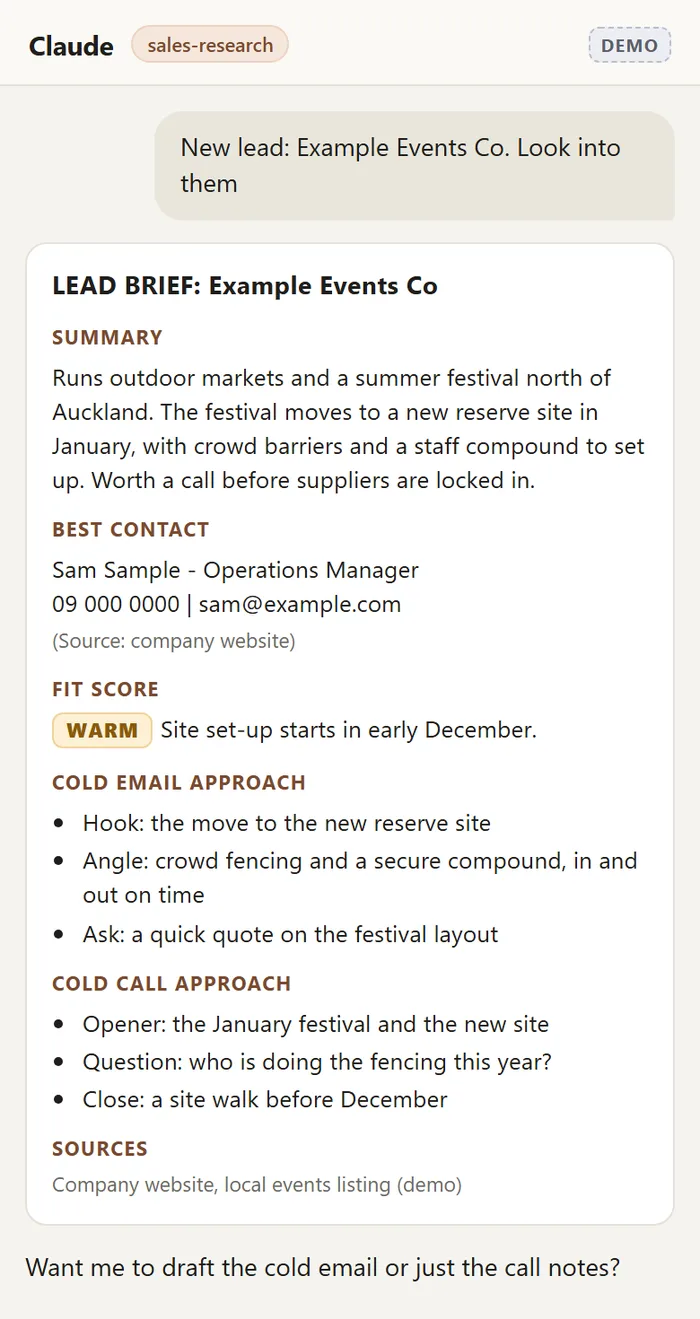
The owner spots leads on the road: a sign on a site, a project announcement, a referral. He drops the name into Claude and gets a one-page brief sized for his phone.
It covers what they do, the best contact, how warm the lead is, and three talking points each for a cold email and a cold call, with every source listed. He makes the contact himself.
Job confirmation emails become calendar bookings
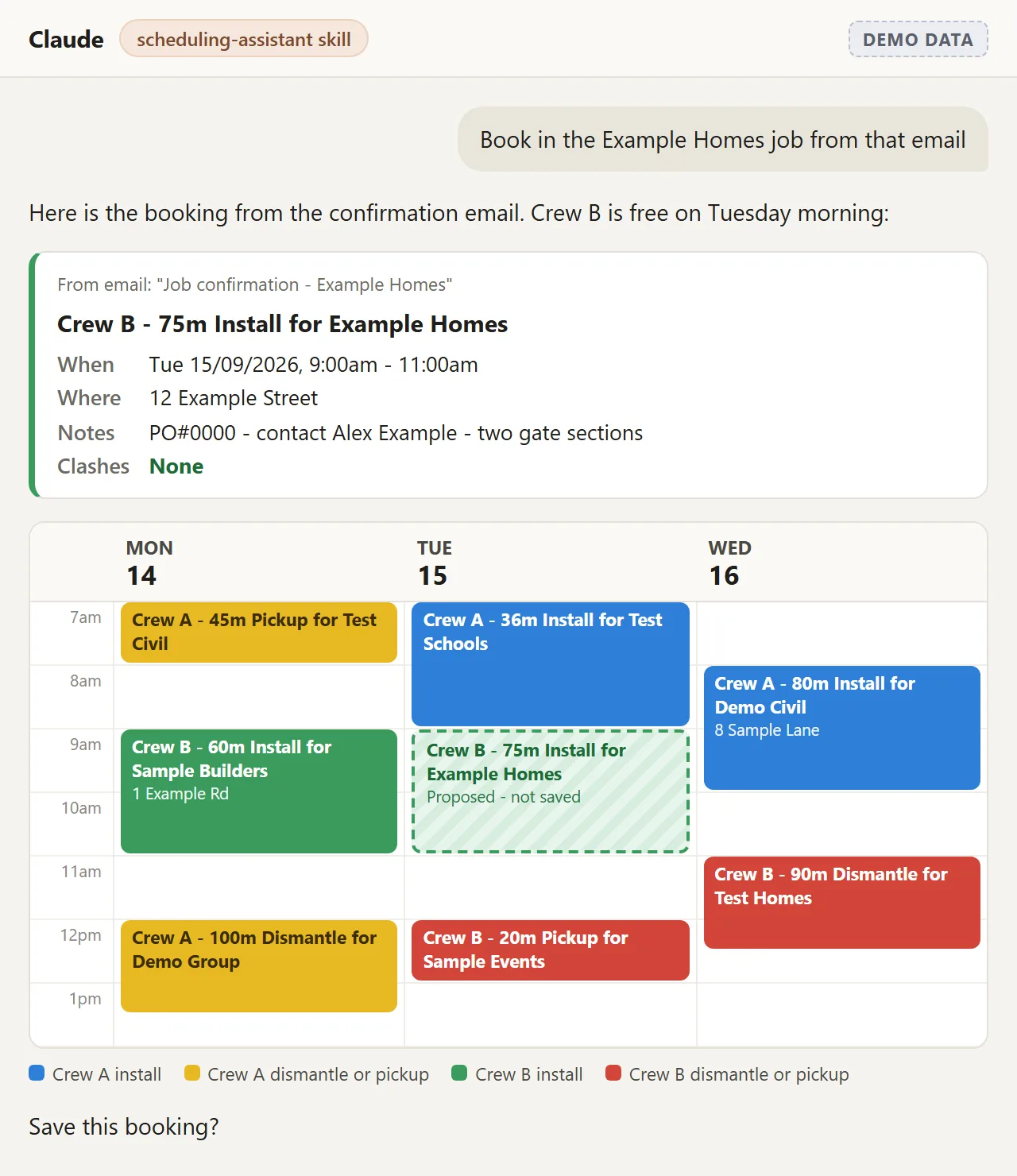
A job confirmation email becomes a calendar entry in the owner's own format: metres, job type and customer in the title, the site address in the location, and a colour for who is on the job.
Claude checks for clashes and reads the booking back before it saves anything. On the road, he can book a job by voice.
The result
Confirmed working in June 2026, with every draft still the owner's call
The owner confirmed the setup was working in June 2026. Invoices, bookings, email replies and lead briefs now start as a Claude draft for him to check, not from scratch.
The setup took one 2-hour video call, with the owner driving and us guiding, so he can run it himself.
The skills are built to grow with the business
The five custom skills are plain written instructions, so they can be sharpened or extended as the business changes. Site Safety's CRM already syncs with the owner's email, so it did not need a Claude connection of its own yet.
Questions people ask
How long did the Site Safety setup take?
The build itself was one 2-hour video call. A short intro call came before it, and a 30-minute follow-up a few days after.
What did the owner have to do before the session?
Sign up for Claude, install the desktop and phone apps, and create a Xero custom connector, using a setup guide we sent ahead. In the session he drove and we guided.
Can Claude send invoices or change ones that have gone out?
No. Every invoice Claude creates stays a draft in Xero, and it cannot touch one that has already been approved or sent. The owner reviews, edits and sends from Xero himself.
How do we start something similar?
Book a call and tell us where the admin piles up. We set Claude up around the way you already work, write skills for the repeat jobs and train you to run it.
More case studies

Maugers Contracting: crews, plant and paperwork, run through Claude
A Christchurch civil contractor whose managers and supervisors built their own Claude tools in three sessions, led by a live staff and plant planner that pulls QuipCheck, Outlook leave and site updates into one view.

 Claude setup and training
Trap and Trigger: team trained, Claude connected to 6 of their tools
An Upper Hutt conservation contractor, trained on Claude in a half-day workshop, then connected to Gmail, Google Calendar, Google Drive, Google Sheets and Docs, Site App Pro and PayHero - health and safety compliance is now one question away.
Running a trade business from the ute?
Invoices, bookings and new work, all squeezed in between jobs. We set Claude up around the way you already work, train you to run it, and keep you in charge of what goes out.
Last updated 29 September 2026