Maugers Contracting: crews, plant and paperwork, run through Claude
Maugers Contracting, a three-generation civil contractor in Harewood, Christchurch, now plans its crews and plant, builds construction programmes and checks timesheets, certifications and legislation changes in Claude, after three hands-on sessions where its own managers and supervisors built the tools.

- Client
- Maugers Contracting
- Industry
- Civil contracting
- Location
- Harewood, Christchurch
- What we did
- Claude Team setup and three half-day build sessions
What the team told us
- 10 minto build the first shared staff and plant planner
- 20 hrsof manual work for a detailed construction programme, now a proofread
- 1 yearof a staff member's timesheets checked in one pass
- Dailyscheduled checks and updates, from leave and pre-starts to expiries and site actions
The short version
- Maugers ran its week across Trello, spreadsheets, QuipCheck, Outlook and inboxes, and its managers spent hours on programmes, timesheets and compliance by hand.
- We set up Claude Team with Microsoft 365 and Xero connected, then ran three sessions where each manager and supervisor built tools on their own work, starting with a live staff and plant planner.
- The planner now shows every crew and machine by site, programmes are proofread instead of built, a year of timesheets is checked in one pass, and certification and legislation checks run on a schedule.
The problem
The week was run from a dozen places, and the checking was all by hand
Who was on which site, on which machine, lived across Trello, spreadsheets, the QuipCheck pre-start app, Outlook calendars and a Friday update in Word. Supervisors rang around to find out where crews and plant were.
A detailed construction programme took a manager around 20 hours. Finance checked timesheets line by line. Legislation changes arrived as law firm marketing emails, and expiry dates for regos and warrants were typed in and chased manually.
About ten people from operations, finance, health and safety, fleet and site supervision took part. A few already used ChatGPT. Most had never built anything with AI.

The solution
One live plan for every crew and machine, built across the workshops
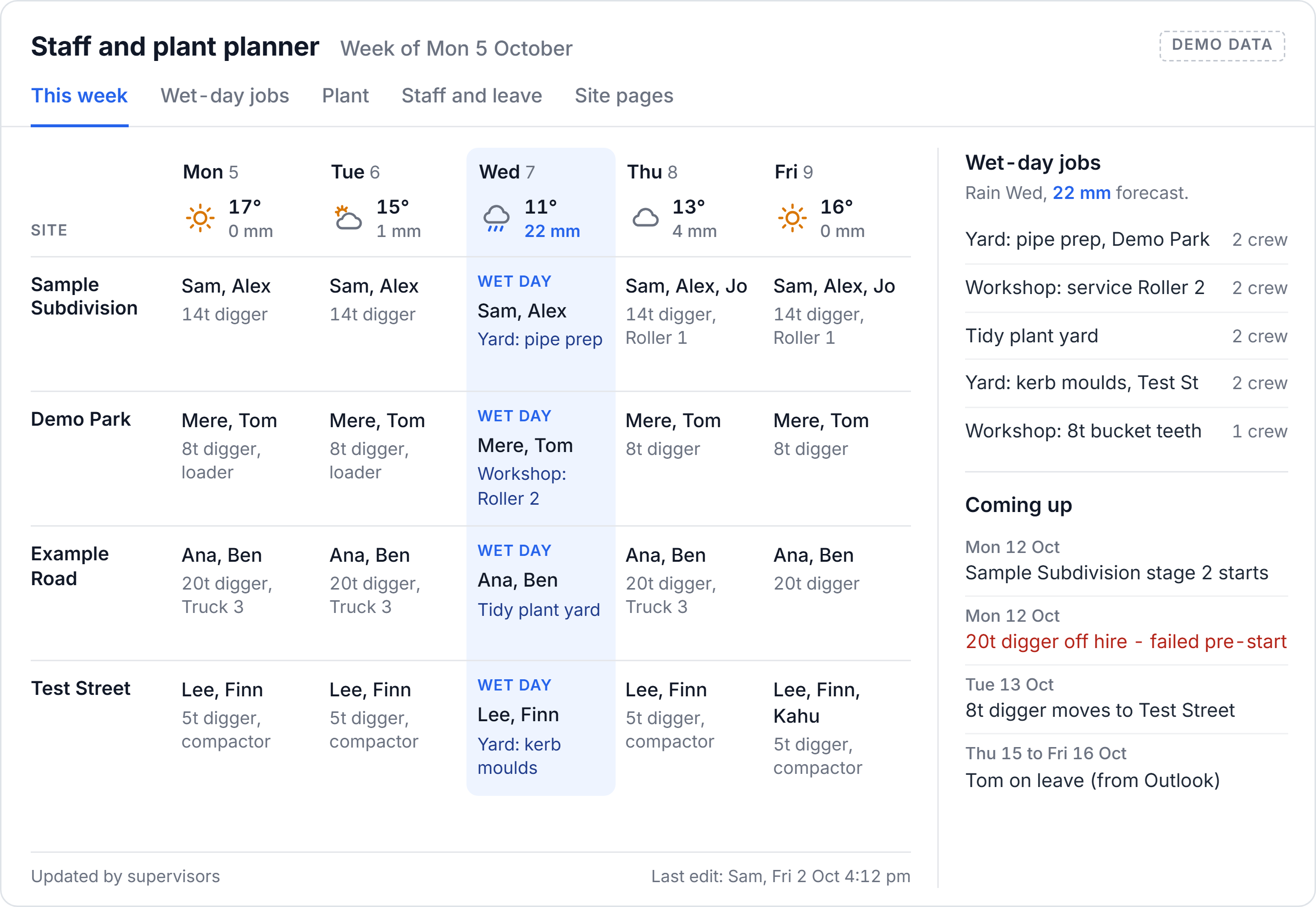
The operations team built the first version of the staff and plant planner as a Claude artifact in about ten minutes, then kept adding to it across the workshops. It pulls Outlook leave every day and reads the hourly QuipCheck pre-start feed, so a machine that fails its check shows up against the site it is booked to. Supervisors update it by voice from their phones. It has a page per site, a list of plant moves, and a wet-day jobs list so everyone can see what other work there is when it rains.
- QuipCheck pre-startsPlant condition, every hour
- Outlook leaveRefreshed daily
- Supervisor updatesTyped or spoken on site
- The live planCrews and plant by site and day
- Supervisors decideWho goes where
In its first week, a supervisor saw another site needed a hydro excavation crew and sent his own. "It was just sitting there. I could see it, it was visual."
Claude plugged into the systems they already run
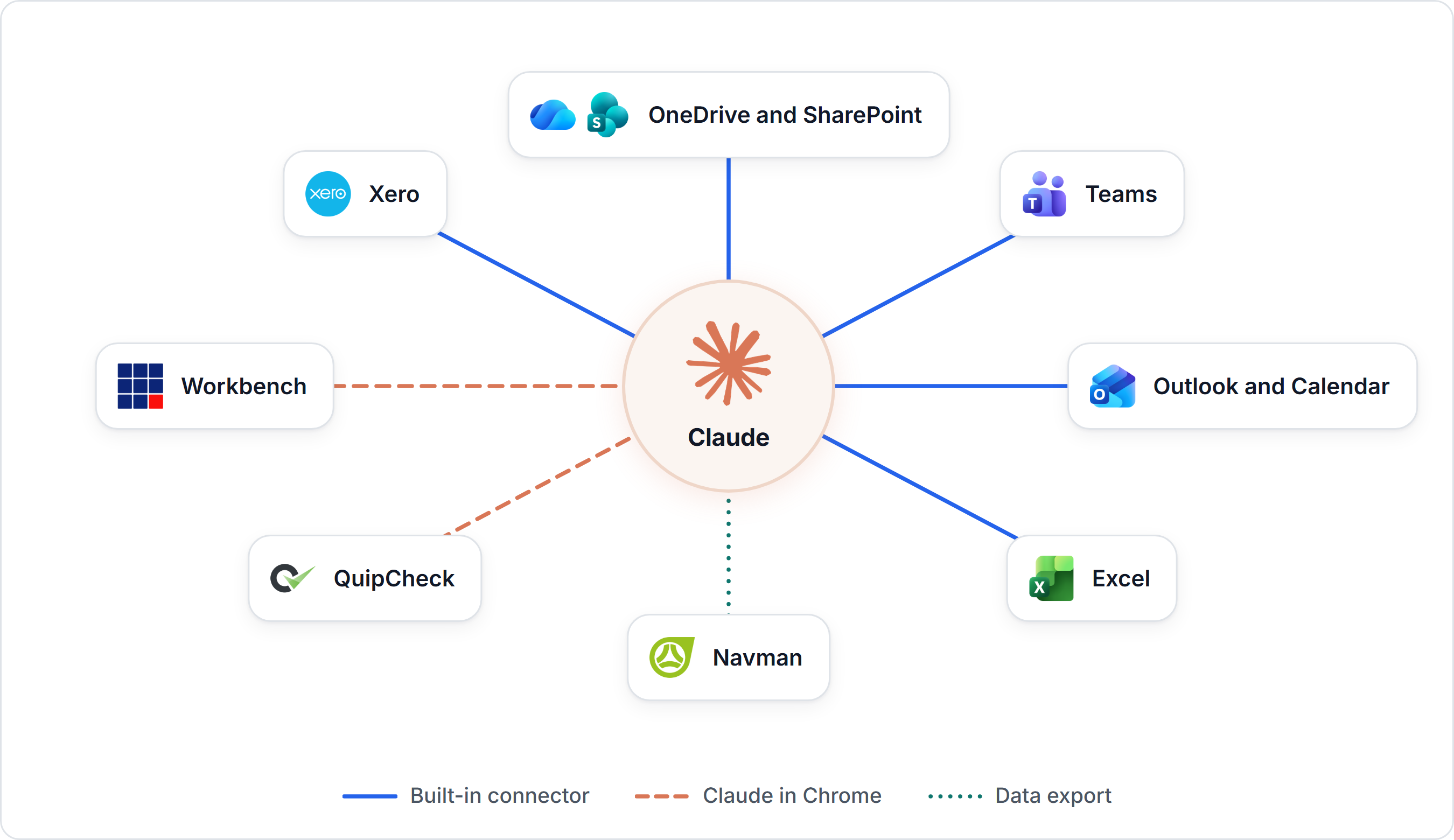
Nobody moved to a new platform. Claude was connected to the tools Maugers already uses, through built-in connectors for Microsoft 365 and Xero, and Claude in Chrome for the web apps without one. Each person connects with their own login.
 Built-in connector
Outlook and Calendar
Emails, meeting pre-reads and leave, read straight into the planner every day.
 Built-in connector
Teams
Team chats and channels, so answers come from the conversations where the work happens.
 Built-in connector
OneDrive and SharePoint
Plans, policies, tender documents and spreadsheets, searched and read in place.
 Built-in connector
Excel
Production rates, training records and reports read and built as spreadsheets.
 Built-in connector
Xero
Finance figures and checks for cash flow and management reports.
 Claude in Chrome
Workbench
Job reports and invoices, from end-of-job reports to chargeable lines.
 Claude in Chrome
QuipCheck
Plant pre-starts and expiry dates, checked every Monday against official records.
 Data export
Navman
Vehicle GPS data, being worked into timesheet checks as the geofences get cleaned up.
Every role built something for its own work
Reports from Xero and Workbench
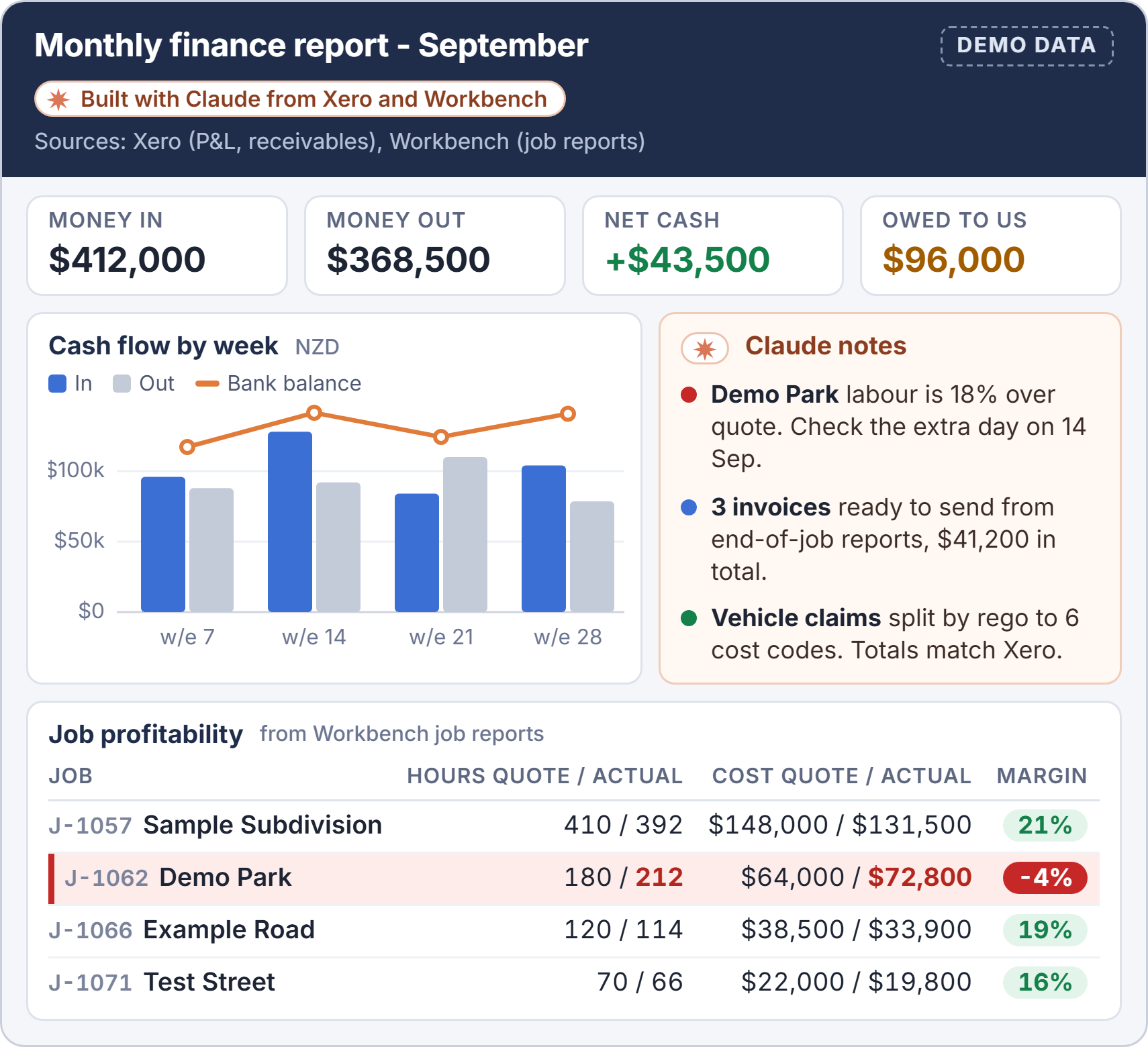
Figures pulled from Xero and Workbench into spreadsheet reports: a large cash flow report, a monthly management report rebuilt from an example, invoices built from end-of-job reports, and vehicle claims split out by rego and coded.
Legislation changes, without the marketing emails
A fortnightly brief on HR and legislation changes, council construction standards checked for changes at the start of every project, and the site safety plan checked against new types of work.
Certifications that stay up to date
Every Monday, Claude checks the regos, warrants and other expiry dates entered in QuipCheck against the official online records and updates them. It just runs in the background now.
Programmes from the plans
Construction programmes broken down manhole to manhole from the tender documents, council standards, a live production rate file and past winning tenders.
The answer, not the search
Site meeting actions sent 24 hours before each meeting, tender documents checked for discrepancies, and staff training records pulled from folders straight into tender submissions.
Claude by voice
Supervisors who are never at a desk dictate toolbox talks on the drive to site, ask PPE questions on the job and update the planner from their phones.
Legislation changes, checked against their own policies
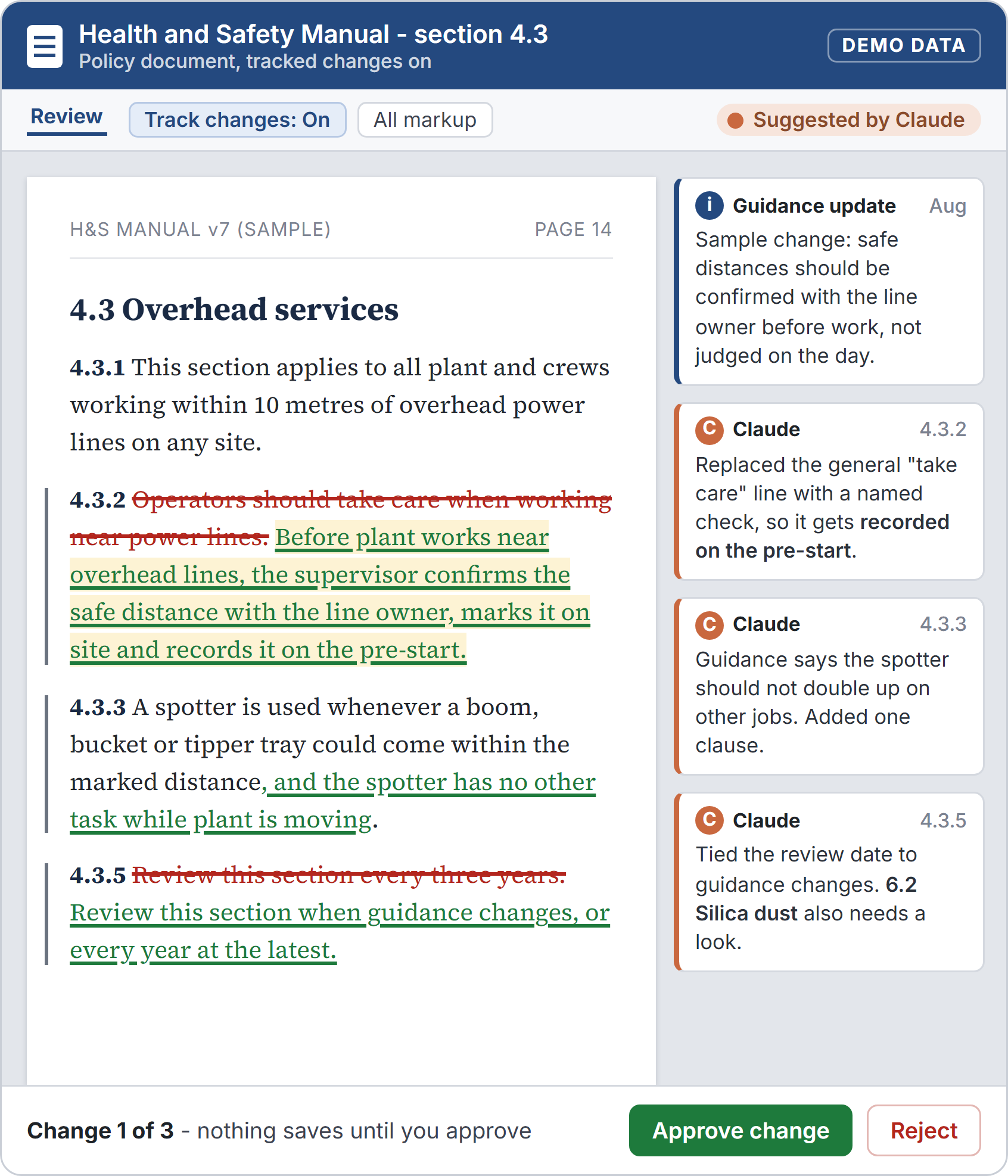
Law changes used to reach the team as law firm marketing emails. Now a fortnightly brief covers HR and legislation updates, and council construction standards are checked for changes at the start of every project.
When the work changes, Claude checks the site safety plan still covers it, and drafts the wording for health and safety to approve.
A 20-hour programme is now a proofread
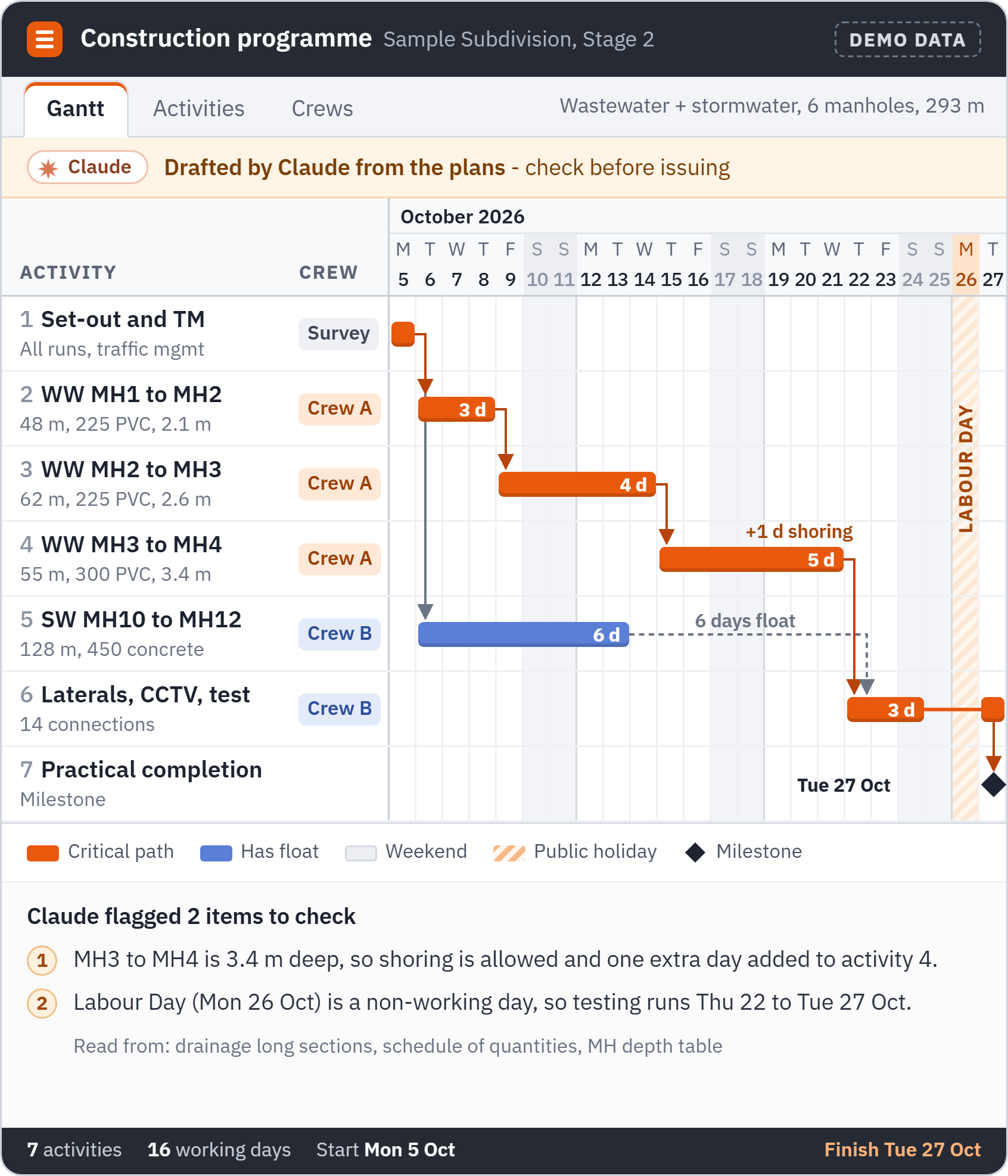
The programme skill reads the tender documents, the council and regional standards, a live production rate file that allows for groundwater, and past winning tenders, then lays the job out manhole to manhole.
The manager who built it said the result was "way more superior to what I could do unless I spent 20 hours on it". It is on its sixth revision, and the job now is checking Claude's version rather than building one from scratch.
The result
Finance says it is like having somebody work for you
Finance used Claude every day between sessions, pulling figures out of Xero and Workbench and into reports. A large cash flow report came together in one sitting, and a monthly management report was rebuilt just by giving Claude an example. "It is like having somebody work for you," said the finance manager. "I feel like I've got a little employee."
It checks as well as builds. A whole year of one person's timesheets went through in one go, and without being asked it spotted leave coded to a job, which would have thrown out that job's costs.
On site, the planner's wet-day list kept crews working after weekend rain instead of sending them home. "It should be the last resort, going home," said a supervisor, who called the planner "a lot clearer than Trello".
It stuck because everyone built from their own work
- Everyone built from their own work, not our examples.
- Every useful chat got turned into a skill the whole team can use.
- Claude checks, people approve. As the finance manager put it, Claude noticed she checks its work rather than taking everything it says.
- We were straight about the limits. Accounts payable coding and GPS timesheet matching need clean rules and data first, so they are on the roadmap, not rushed.

What comes next: the team keeps building without us
The team no longer needs us in the room to keep going. They are extending the planner themselves, next with weather, training and ticket expiries, site meeting actions and yard availability.
Just as important, they know how to spot repetitive work, turn it into a skill and put it on a schedule, so each person can keep automating their own tasks as they find them.
Questions people ask
How long did it take?
Three half-day sessions a week apart in September 2026, after Claude Team was set up with Microsoft 365 and Xero connected. Each person left every session with something working on their own tasks.
What did the Maugers team have to do?
Bring real work. Each person wrote out one task they do every week and built it in the room, then kept using it between sessions. Useful chats were saved as skills the whole team can use.
Is company data safe in Claude?
The company runs its own Claude Team workspace, and each person connects with their own access, so nobody sees more than they already could. Claude drafts and checks, and a person approves anything that goes out or changes a record.
How would we start something similar?
Start with Claude Setup: we connect your systems, then run hands-on sessions where your people build on their own work. The first session maps every role's pain points so the builds go where the time is.
More case studies

 Claude setup and training
Site Safety: Claude set up across six parts of the week in 2 hours
A temporary fencing hire firm from South Auckland to Whangarei got Claude set up across six parts of the week in one 2-hour session, drafting invoices, bookings and lead briefs for the owner to sign off.

NZ builder: 29 AI use cases, mapped and ranked
Two workshops with a New Zealand builder: the team tagged every step of their own processes, and 29 AI use cases were scored into a ranked list and a 90-day plan.
Want your team building like this?
We set Claude up for your business, then run hands-on sessions where your people build on their own work, not demos.
The screens and graphics on this page are illustrations with made-up data. They are not representative of the actual product delivered and are used as aids only.
Last updated 29 September 2026