AI for tradies · New Zealand
AI for tradies: less paperwork, more time on the tools
In short
We set Claude up in the tools your trade business already runs, so it checks and chases quotes, turns voice notes from the ute into job notes, drafts invoices in Xero and writes up safety paperwork. It writes the draft, you check it and send it. Most businesses start with one job, usually invoicing.
 Blake HarknessFounder, Harkness AI, Christchurch
- 5.0Average Google review
- 50+Businesses helped across NZ & Australia
Trades and construction businesses we have worked with






The five jobs
Five jobs AI takes off a tradie’s week
Quoting
Check the quotes, then chase them
Claude lines up supplier and subbie quotes like for like, so the cheap one with half the work excluded stands out. Then it lists every quote you sent that nobody answered, and drafts a short follow-up for each.
Built in a hands-on session with Cohesive and Wide Span Sheds, Christchurch.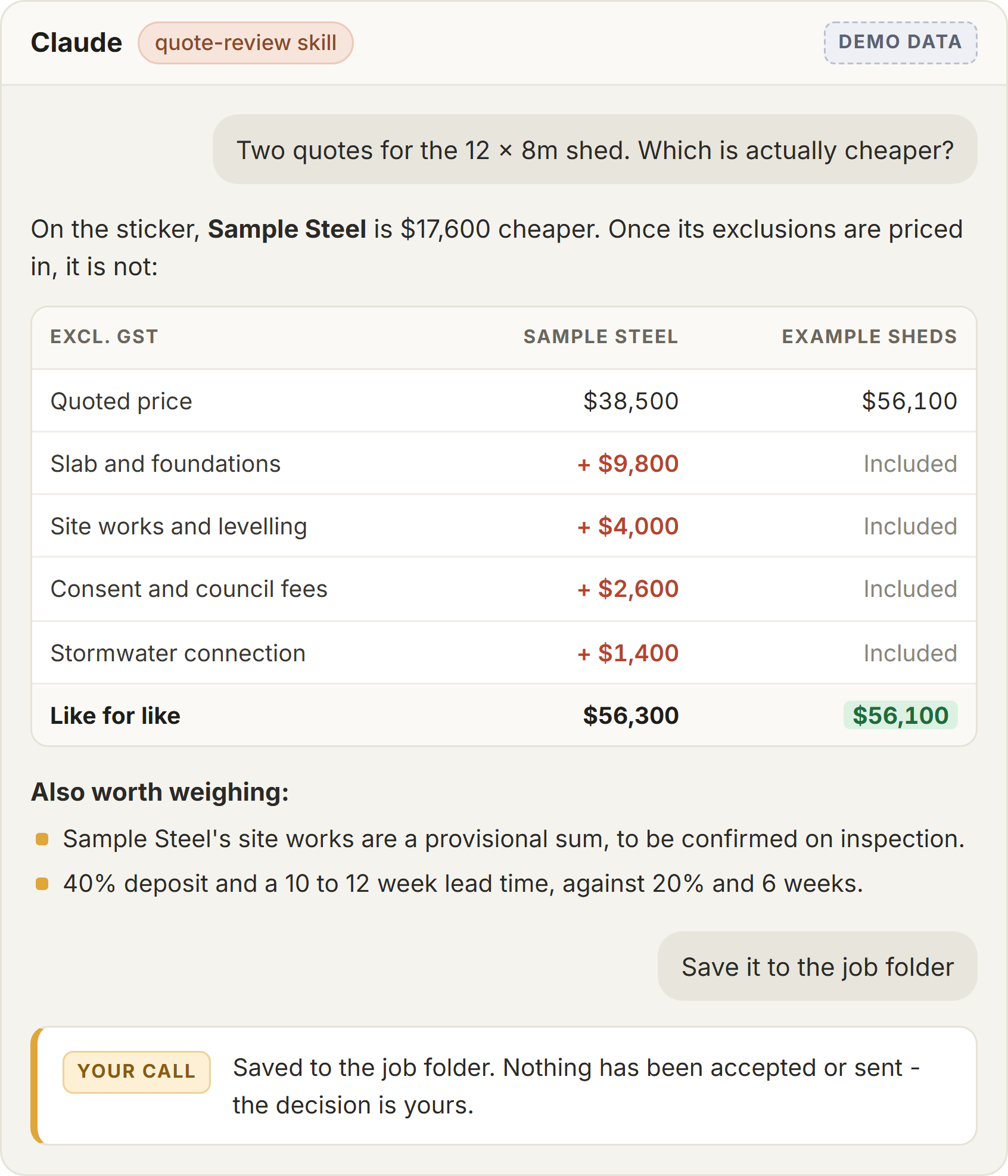
Two made-up quotes, compared like for like. The call stays yours. Job notes by voice
Say it in the ute, get it written up
Talk into the Claude app on your phone between jobs. The rambling voice note comes back as a tidy job note, a toolbox talk or an update to the day plan, instead of a scribble on the dash you have to decode on Friday.
Maugers Contracting supervisors dictate toolbox talks on the drive to site.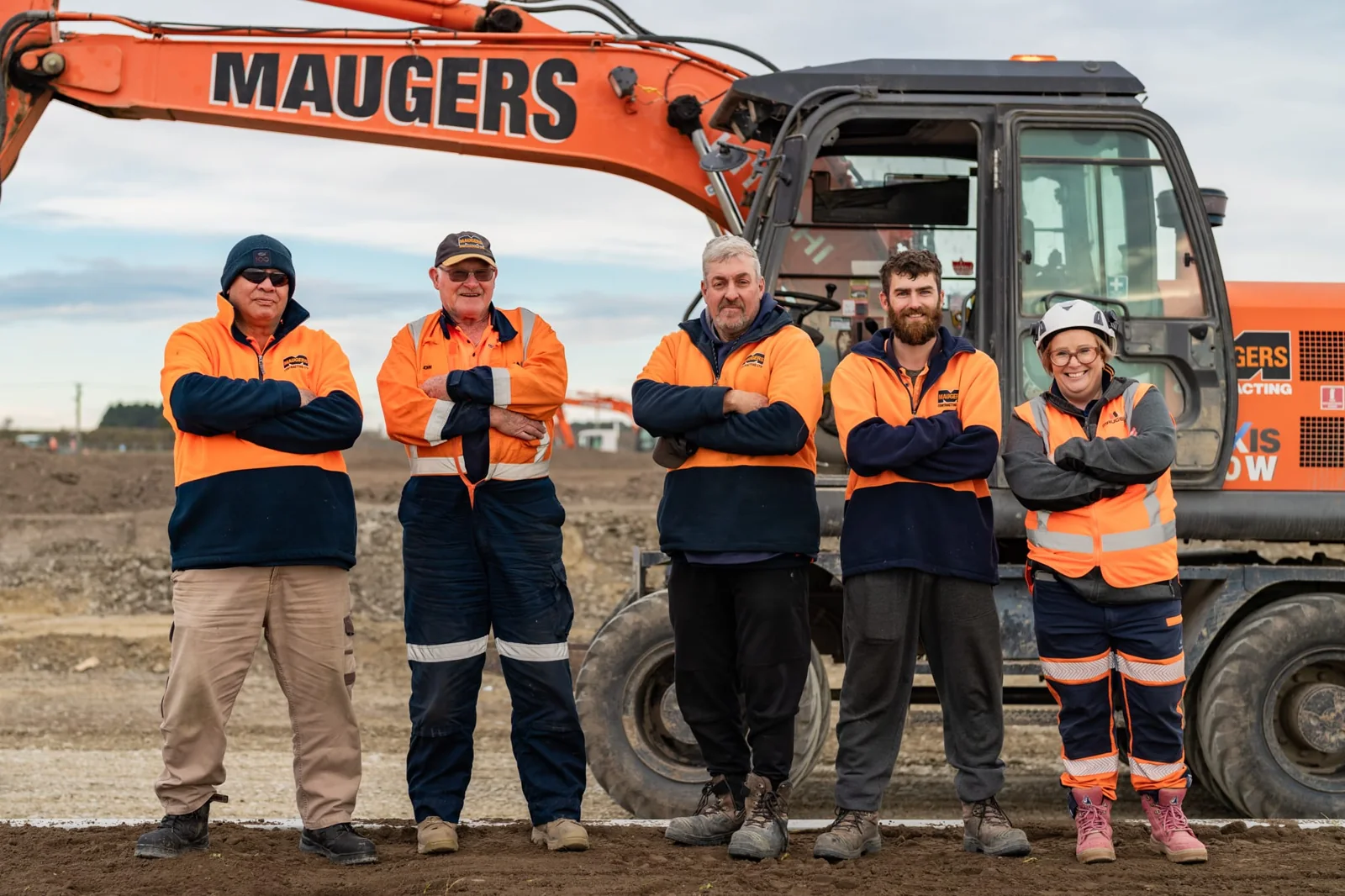
Maugers Contracting crew. Photo from their own website. Invoicing in Xero
Last month’s invoice, redone as a draft
Claude copies last month’s invoice, changes the period and shows you exactly what changed. It lands in Xero as a draft. You check the GST and the due date, then approve it yourself.
One of the skills set up for Site Safety, a temporary fencing hire firm, South Auckland to Whangarei.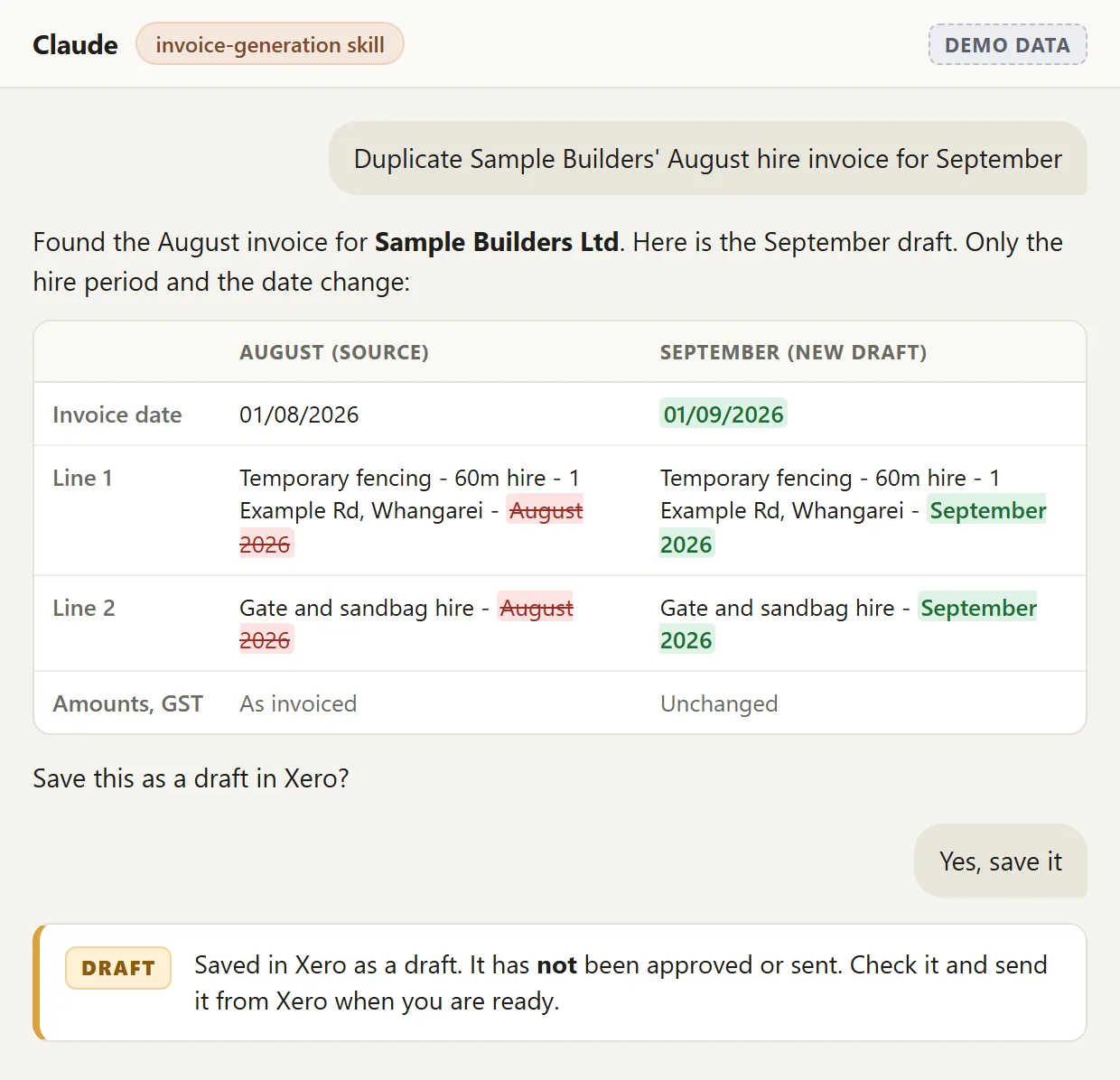
The invoicing skill on a made-up customer. ServiceM8, simPRO, Buildxact
Tomorrow’s jobs, out of your job software
Connect Claude to the job software you already pay for and ask for tomorrow’s run sheet, the jobs over budget or who has free hours next week. ServiceM8 and Fergus have their own Claude connectors. For simPRO and Buildxact we build them.
A read-only simPRO connector built for IGP, a Waikato engineering group, for its leadership workshop.- XeroXero’s own connectors
- ServiceM8Own Claude connector
- FergusOwn Claude connector
- simPROConnector we built
- BuildxactConnector we built
- Site App ProConnected for a client
- PayHeroConnected for a client
- Microsoft 365Built-in connectors
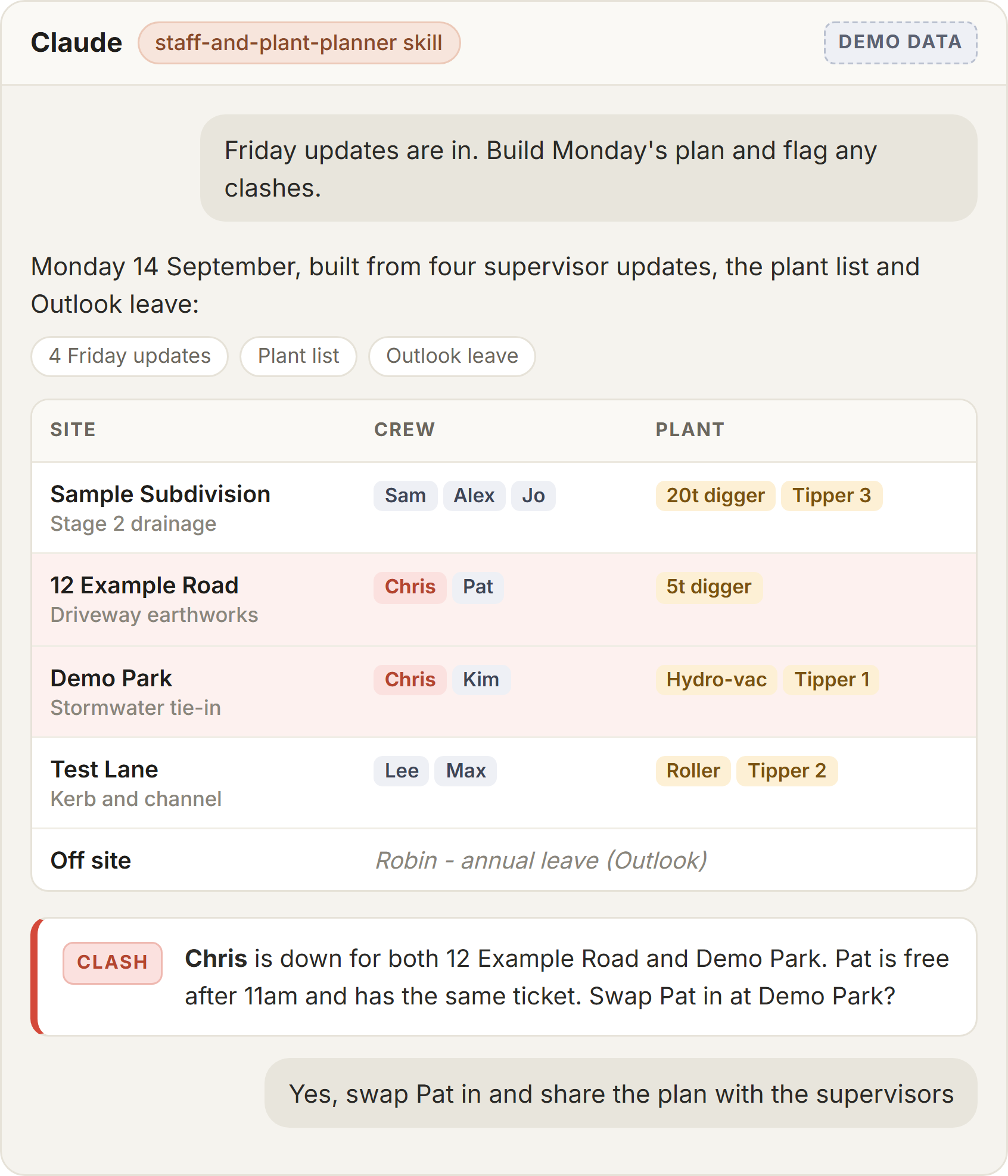
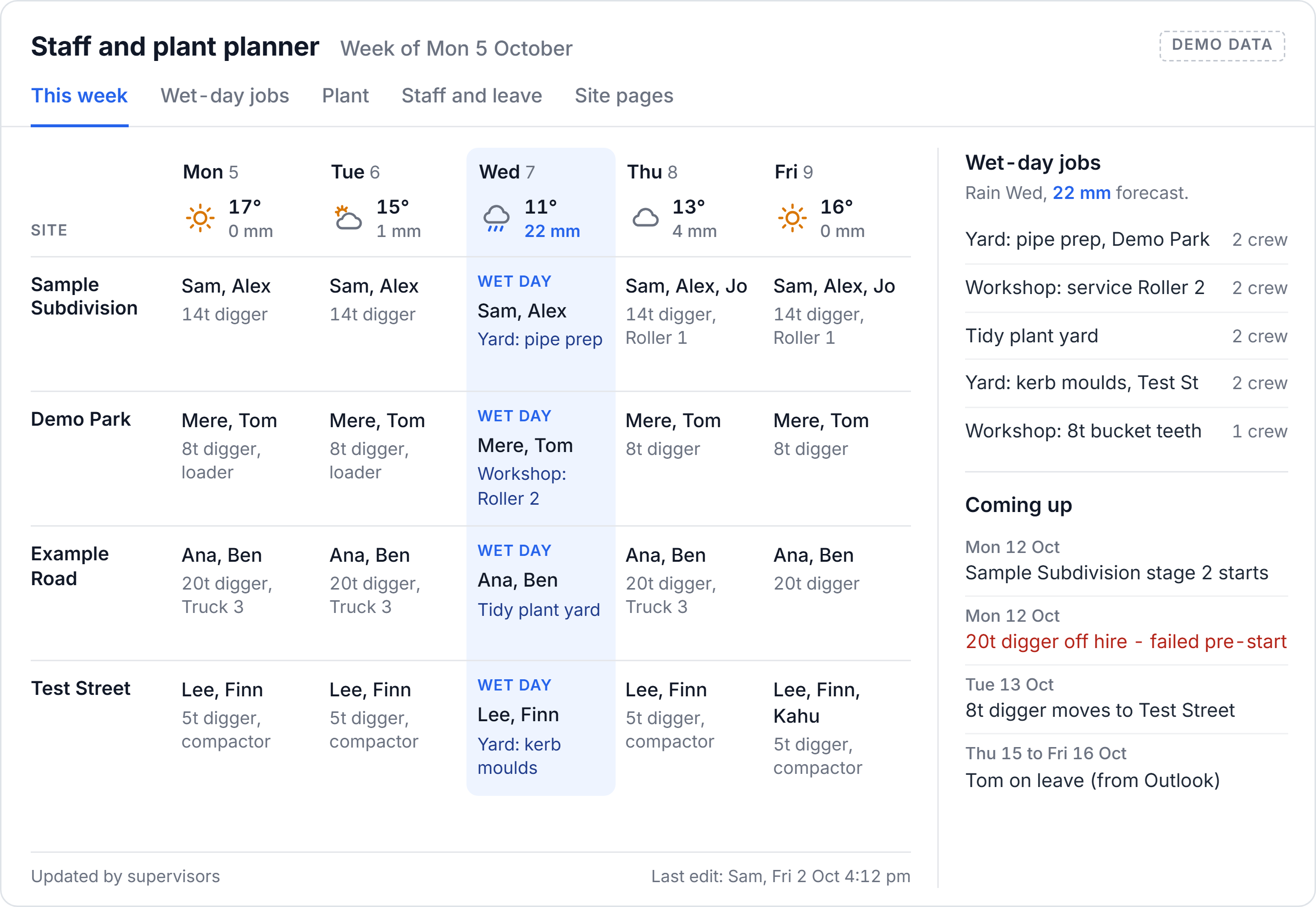
A made-up Monday plan, with the clash flagged before anyone rings around. Safety docs
Safety paperwork drafted, and kept current
Toolbox talks, JSAs and site safety plans drafted against your own templates. When guidance changes, Claude marks up your policy with suggested edits for you to accept or reject, and tells you which forms are still missing.
Maugers gets a fortnightly legislation brief. Trap and Trigger checks Site App Pro forms by asking.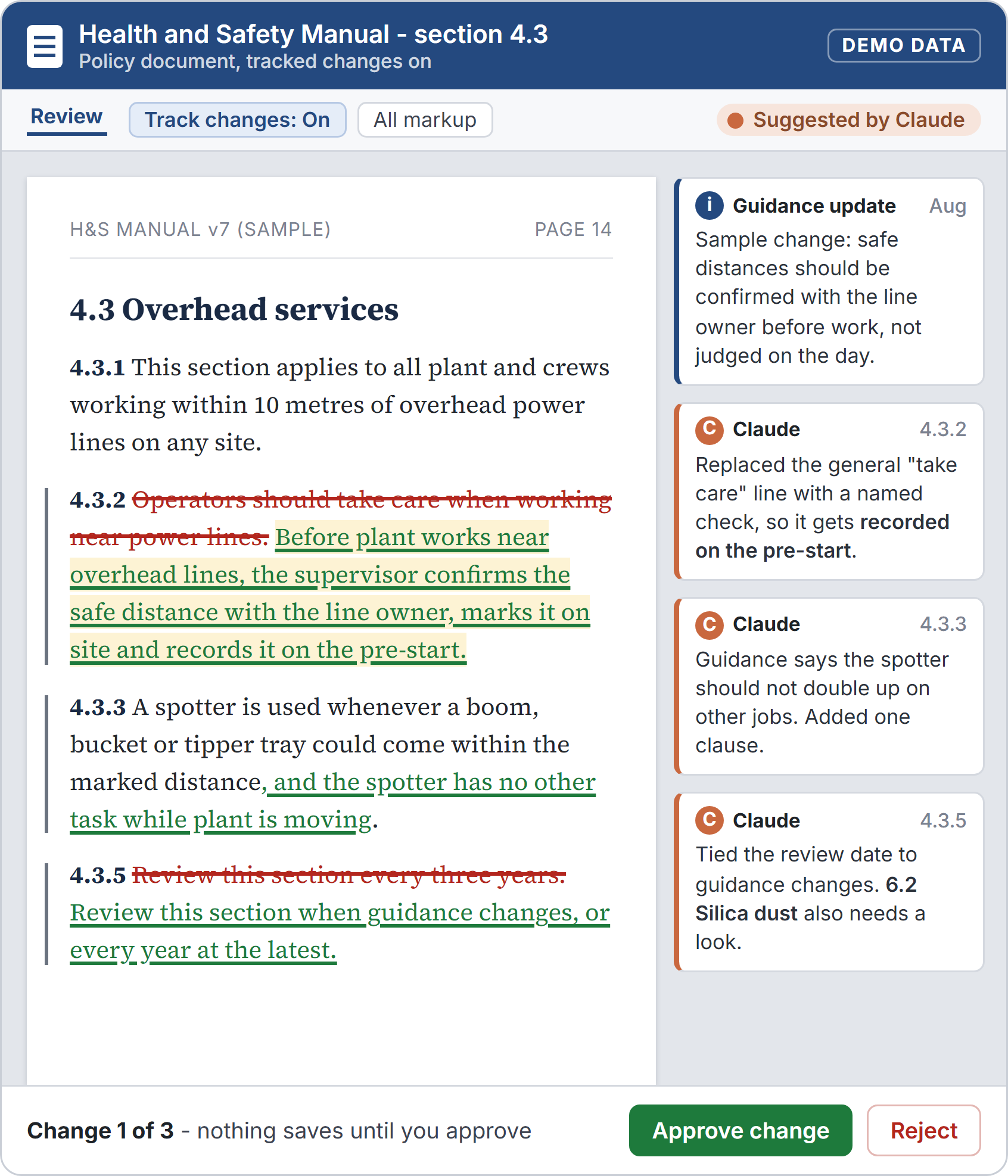
Guidance changes against your own policies. Made-up data.
Case study · Civil contracting · Christchurch
Maugers Contracting built their own tools in three sessions
A three-generation civil contractor in Harewood. Their managers and supervisors now plan crews and plant, build programmes from the plans and check timesheets in Claude, with Microsoft 365 and Xero connected. Supervisors update the plan by voice from site.
- 10 minto build their first shared staff and plant planner
- 20 hrsof work on a construction programme, now a proofread
- 1 yearof one person’s timesheets checked in one pass
Reviews
What trades and construction clients say
Blake ran a couple of sessions for my team. He was fantastic; he made it really simple for the whole team to understand, regardless of their previous AI experience.

Blake has become our go-to for everything AI in our business - from setting up Claude and training our team, to building integrations like our PayHero setup that we had struggled with ourselves. He is a genuine sounding board, hits his timelines, and hands over tools that work with clear instructions. We would happily recommend Blake and Harkness AI to any business looking to get real value out of AI.
Read the full review
Blake has become our go-to for everything AI in our business. He started by helping us set up Claude across the business and training our team to actually use it well, then built out a range of connections between our AI systems and the apps we run day to day, both native integrations and custom ones like our PayHero setup that we had struggled to get working ourselves.
Beyond the technical builds, Blake has been a genuine sounding board. He talks through our ideas with us, gives honest advice on what is worth doing, and steers us away from things that will not pay off. He has built us AI tools for reporting and project tracking that have made a real difference to how we operate.
What stands out is how easy he is to deal with. He keeps us in the loop, hits his timelines, and hands over tools that work along with clear instructions so we can run with them. He knows his stuff and gets things done.
We would happily recommend Blake and Harkness AI to any business looking to get real value out of AI.
 Nick ZaloumisDirector, Trap and Trigger Ltd
Go deeper
Want the step-by-step version?
Our trades use-case hub walks through tenders, run sheets, quote chasing, debtor lists and crew paperwork, with videos for each. Bigger firms should read AI for construction, and one-person businesses AI for sole traders.
FAQ
Tradies ask us
What can AI actually do for a trade business?
The jobs that pay off first are the office ones: checking and chasing quotes, turning voice notes into job notes, drafting invoices in Xero, pulling tomorrow's jobs out of ServiceM8, simPRO or Buildxact, and drafting safety paperwork like toolbox talks and JSAs. AI writes the draft, and you check it and send it.
Is AI worth it for a one-person trade business?
Usually, if you start with the job you put off most. A single Claude plan is a small monthly cost, so if it gives you back an hour a week on quotes or invoices it has paid for itself. Start with one job, not a platform.
Can I use it from my phone on site?
Yes. The Claude phone app takes voice, so you can talk a job note, a toolbox talk or a quote follow-up into it from the ute. The connectors in Claude's directory, such as ServiceM8, Fergus and Xero's read-only one, work on the phone too. Connectors that draft into Xero run on a computer.
Does AI work with ServiceM8, simPRO, Buildxact or Fergus?
Yes. ServiceM8 and Fergus have their own Claude connectors that you add in Claude's settings. For simPRO and Buildxact we build a connector to their API, read-only unless you need it to write. We built a read-only simPRO connector for IGP's leadership workshop.
Will it send anything to my customers without me?
Not the way we set it up. Every job ends in a draft: an email in your drafts folder, an invoice marked draft in Xero, a note in the chat. Some connectors can text or email customers, so we switch those tools to blocked or ask-first when we add them.
Can AI write our health and safety documents?
It can draft them against your own templates and site conditions, which is where the time goes: toolbox talks, JSAs, site safety plans and hazard registers. It can also check your policies when guidance changes. A person still reads, edits and signs off every document.
What does it cost to get set up?
It depends on how much you want done - one job automated, your whole crew trained, or a bigger build across job management and accounting. We quote a fixed price in writing after a free 30-minute call, before anything starts.
Pick the one job you hate most
Tell us which piece of paperwork eats your evenings. On a free 30-minute call we will tell you straight whether AI can take it, then quote a fixed price to set it up in the tools you already run.
Talk to us about your businessLast updated 6 October 2026