
 Xero MCP · New Zealand
Claude and Xero’s MCP server, for NZ businesses
In short
Xero’s own open-source MCP server lets Claude read your New Zealand Xero books and draft invoices, bills, quotes and credit notes, always as drafts you approve. It runs in Claude Desktop or Claude Code through a Xero custom connection, and it won’t do your GST return. We set it up with the least access it needs.
 Blake HarknessFounder, Harkness AI, Christchurch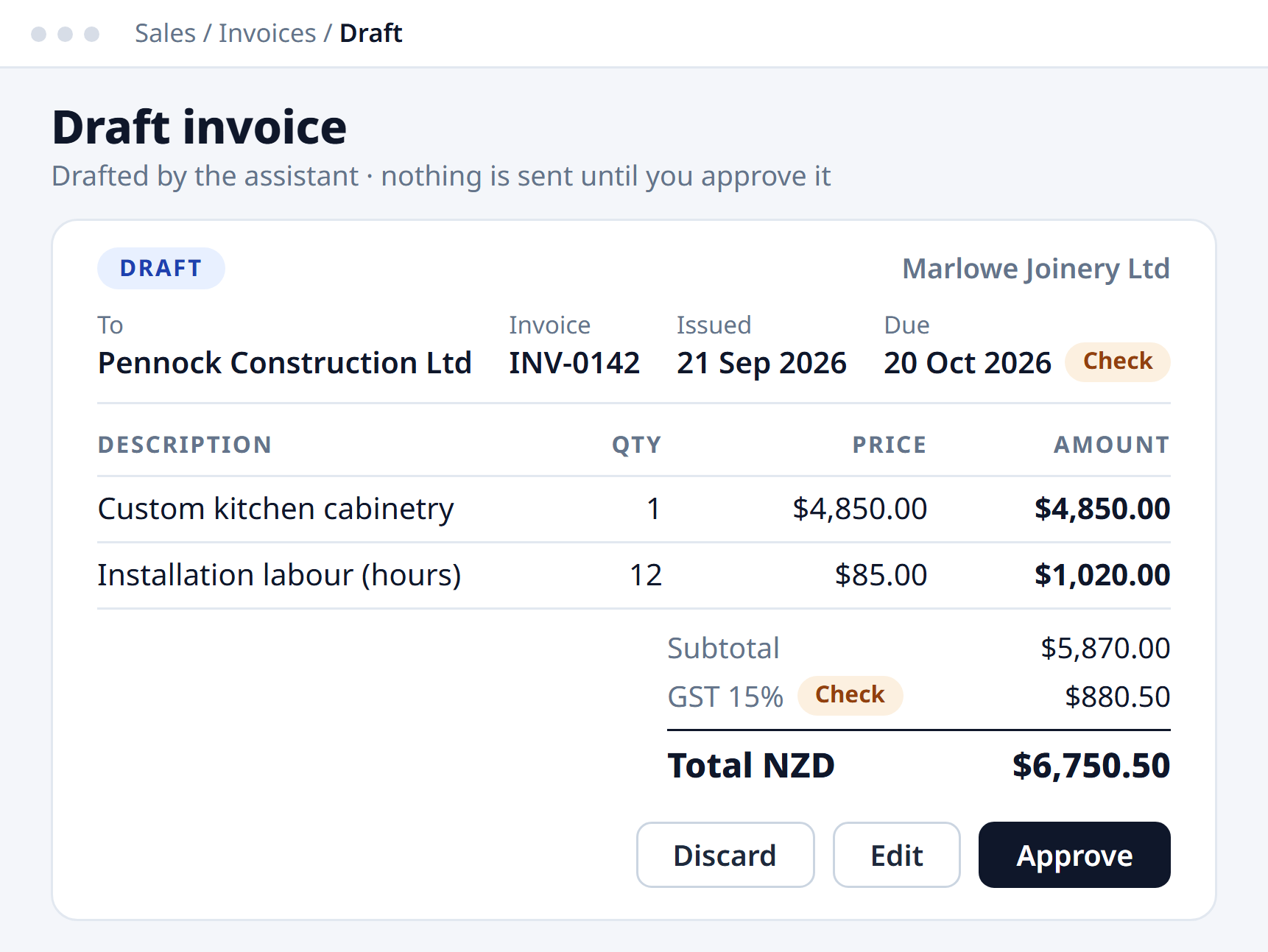
The verdict
What it does, and where it stops
Works in NZ
- Drafts invoices, bills, quotes and credit notesAlways as drafts. The server has no tool to approve or email them.
- Reads your booksInvoices, bills, contacts, bank transactions, payments, and reports like profit and loss.
- NZ payroll timesheets and leavePayroll tools cover New Zealand and UK organisations.
- Free to try firstA custom connection to Xero’s Demo Company costs nothing, and it switches to the NZ version.
Doesn’t, or needs care
- No GST returnIt picks each line’s tax rate from your Xero list. Your return stays with you and your accountant.
- No due date fieldDrafts take your default payment terms, so check the date before you approve.
- One organisation, one computerEach custom connection is one Xero organisation, running in Claude Desktop or Claude Code. Not the phone app.
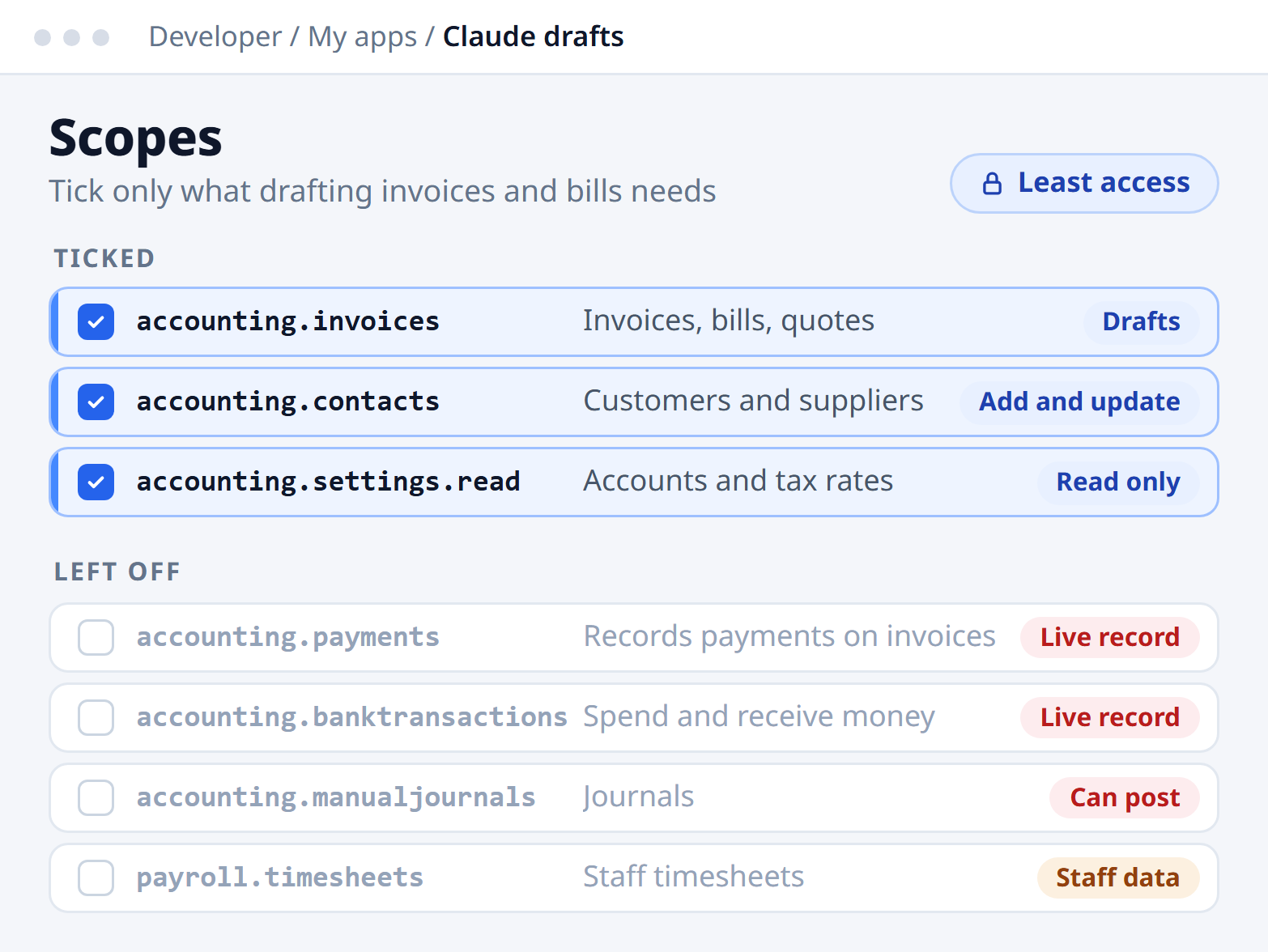
- Some tools write live recordsPayments and bank transactions save as real entries, not drafts. Leave those scopes off.
Why people say it won’t work
Four complaints, and what is actually true
“Claude can only read Xero.”
That is the connector in Claude’s directory, and it is read-only by design. The MCP server is a separate tool, also made by Xero, and it drafts.
Xero Central on the read-only connector“It only connects one organisation.”
True of each custom connection. For Shakti Mat we built a read-only connector that reports across the business’s Xero organisations in one chat.
Shakti Mat case study“It will wreck my books.”
Invoices, bills, quotes and credit notes land as drafts, and Claude Desktop asks before each tool runs. Tick only the invoice, contact and read-only settings scopes and it cannot touch payments.
The draft-only code, on GitHub“It doesn’t know NZ GST.”
It uses the tax rates already in your Xero, so 15% GST comes from your own list. Check it on every draft, the same as you would check a new staff member.
GST, Inland Revenue
In real NZ businesses
Claude and Xero, already doing the work
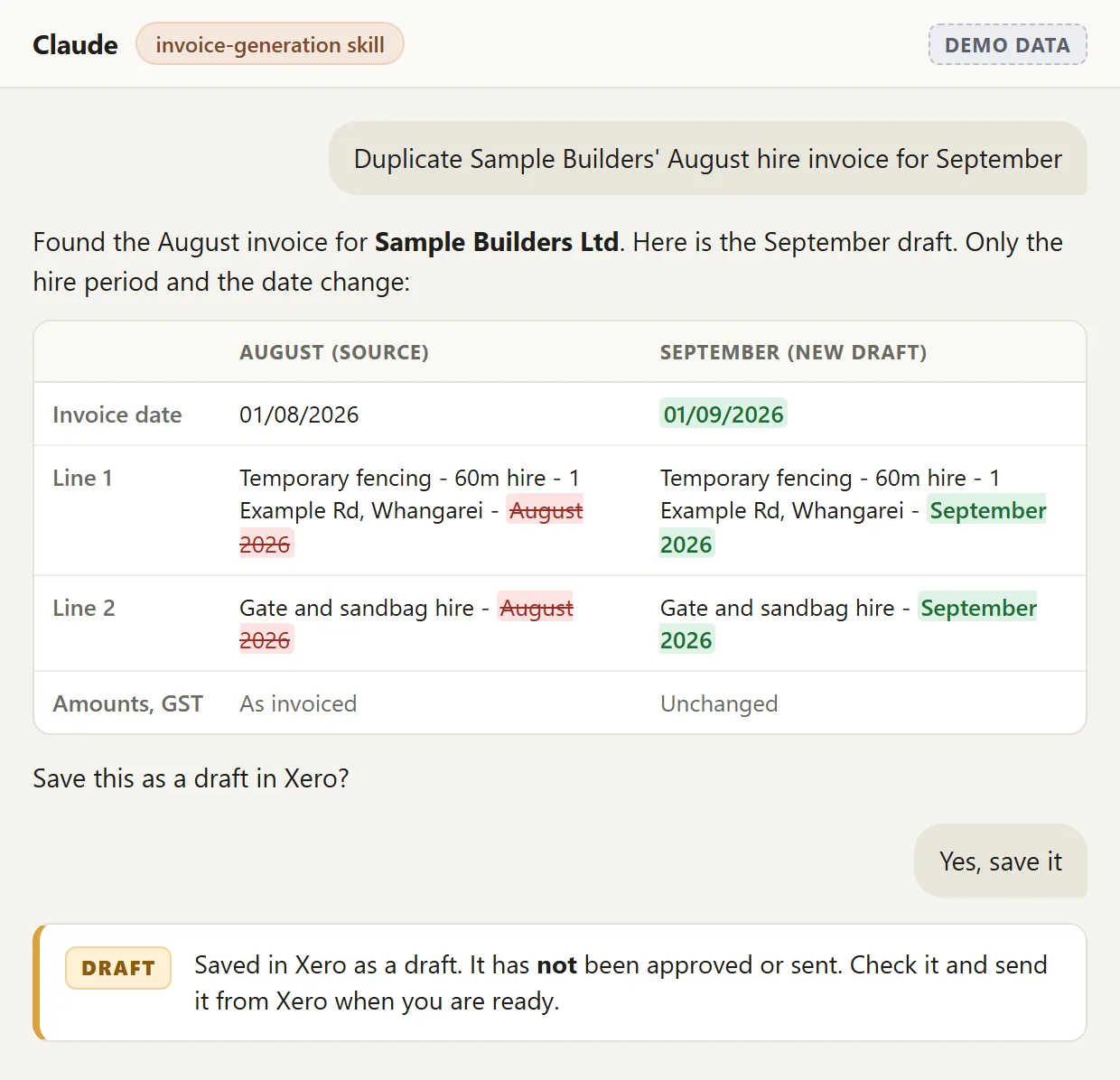
The invoicing skill on a made-up customer. Site Safety · Temporary fencing hire · Auckland
Hire invoices drafted for the owner to approve
Claude duplicates last month’s hire invoice, updates the period and saves it in Xero as a draft. It never approves or sends one.
Read the case study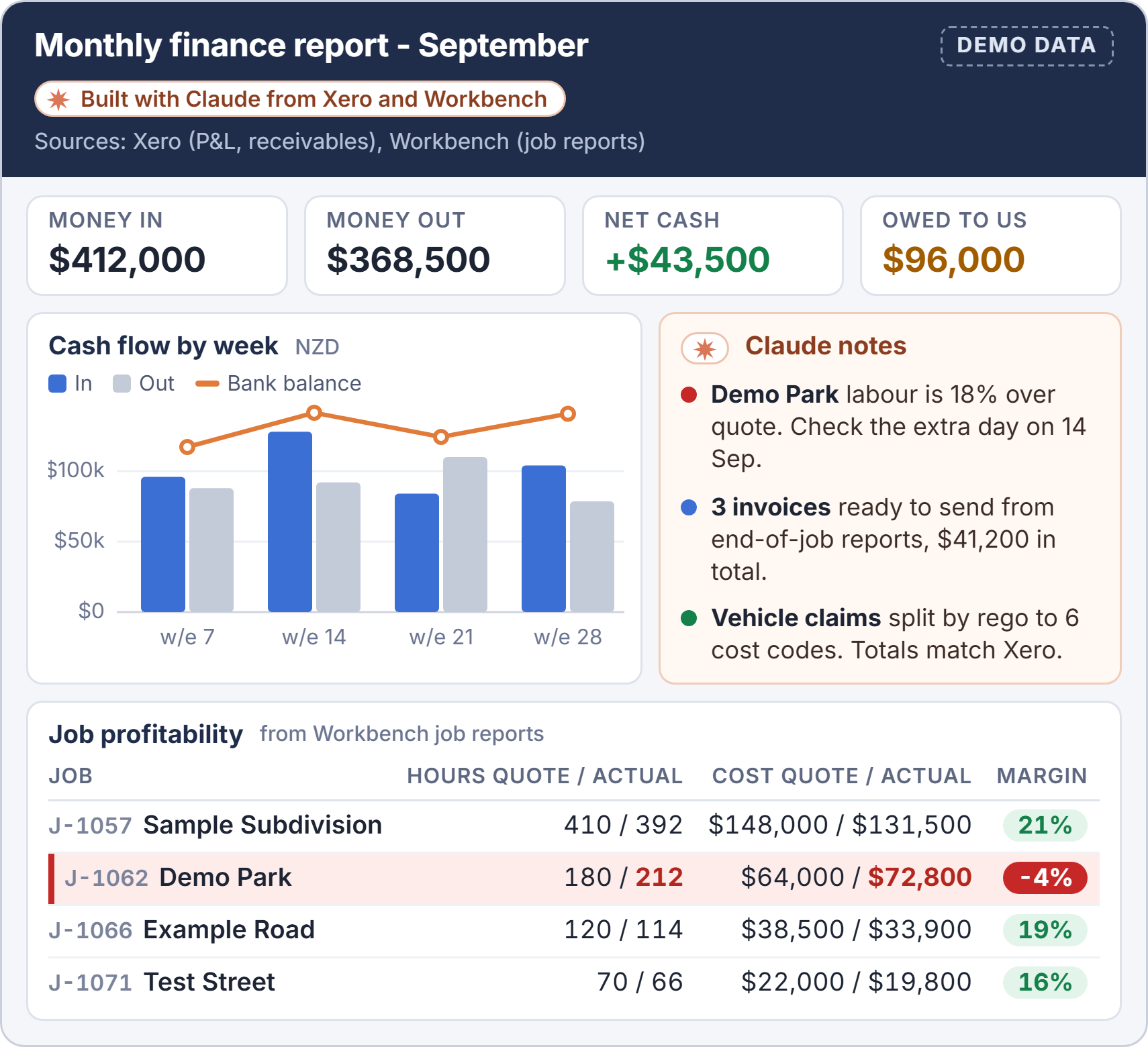
A monthly report from Xero and Workbench. Made-up data. Maugers Contracting · Civil · Christchurch
Cash flow and monthly reports out of Xero
Finance pulls figures from Xero and Workbench into reports, including a monthly management report rebuilt just by giving Claude an example.
Read the case study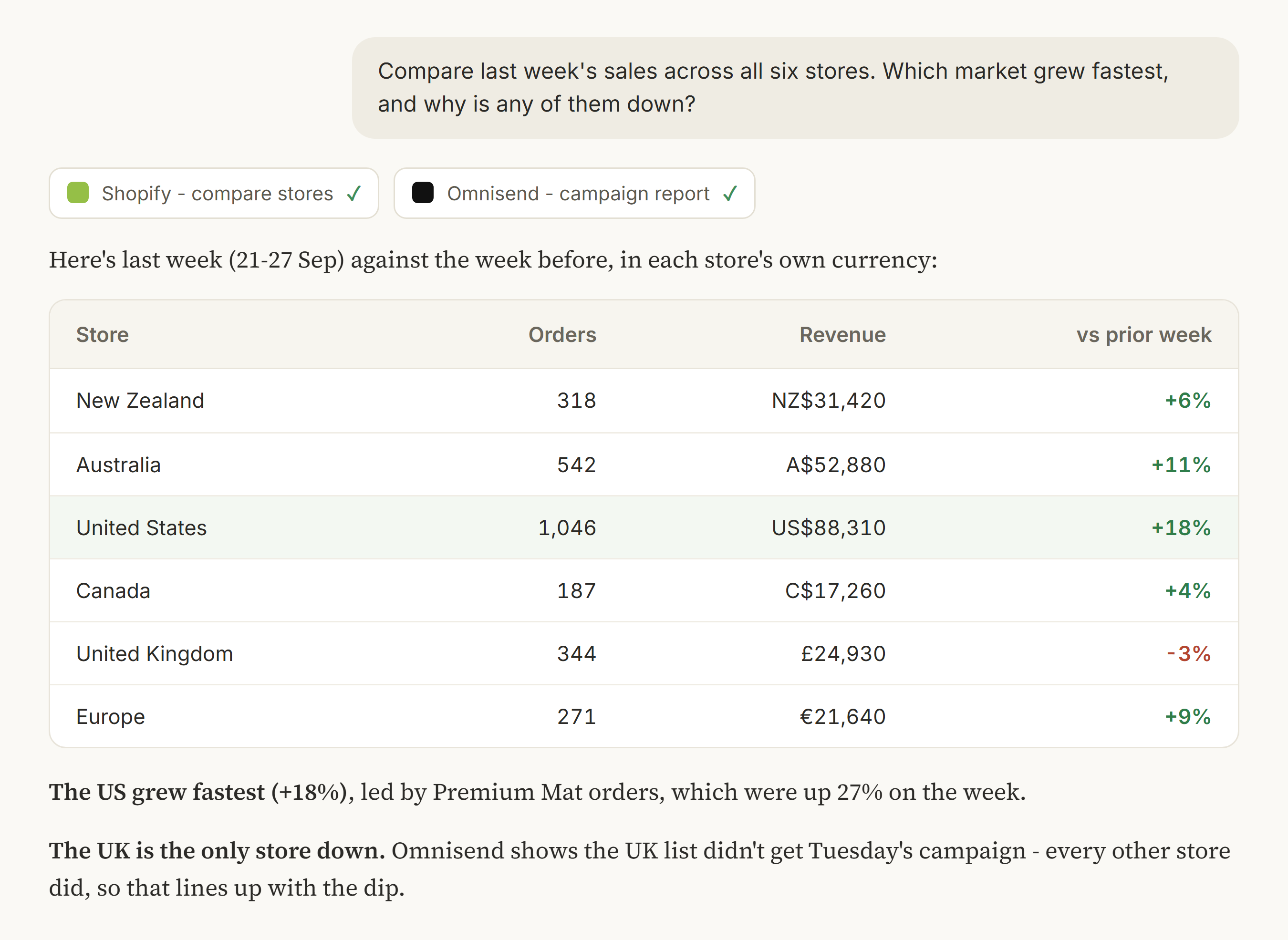
Example with sample data, not Shakti's real numbers. Shakti Mat · Ecommerce · Christchurch
Xero beside six Shopify stores, in one chat
Read-only reporting across the business’s Xero organisations, next to Shopify, stock and marketing. Staff install the connectors themselves.
Read the case study
Trap and Trigger in Upper Hutt runs a nightly Xero sync into its track record spreadsheet. Read how.
The tutorial, April 2026
The video that showed NZ owners it works
Blake recorded the Xero MCP setup end to end, with the quick wins he runs in his own business. Owners watched it, then asked us to set it up for them.
- 12enquiries from the one video
- 8of them became clients
Recorded before Xero moved custom connections to granular scopes, so tick the three above rather than the ones on screen. Read the written version.
Reviews
From businesses we have connected
Blake gets it - prompt, professional, knows his stuff. He took us through the easy set ups and built custom connectors and processors for our more niche requirements. Quick, fun and already changing the way we work.

Blake has become our go-to for everything AI in our business - from setting up Claude and training our team, to building integrations like our PayHero setup that we had struggled with ourselves. He is a genuine sounding board, hits his timelines, and hands over tools that work with clear instructions. We would happily recommend Blake and Harkness AI to any business looking to get real value out of AI.
Read the full review
Blake has become our go-to for everything AI in our business. He started by helping us set up Claude across the business and training our team to actually use it well, then built out a range of connections between our AI systems and the apps we run day to day, both native integrations and custom ones like our PayHero setup that we had struggled to get working ourselves.
Beyond the technical builds, Blake has been a genuine sounding board. He talks through our ideas with us, gives honest advice on what is worth doing, and steers us away from things that will not pay off. He has built us AI tools for reporting and project tracking that have made a real difference to how we operate.
What stands out is how easy he is to deal with. He keeps us in the loop, hits his timelines, and hands over tools that work along with clear instructions so we can run with them. He knows his stuff and gets things done.
We would happily recommend Blake and Harkness AI to any business looking to get real value out of AI.
 Nick ZaloumisDirector, Trap and Trigger Ltd
Want to do it yourself? Our step-by-step Xero guides cover the setup, scopes and a first test on Xero’s Demo Company. Want it built around your business? See Xero AI integration.
FAQ
Xero MCP questions
What is the Xero MCP server?
It is Xero's own open-source MCP server, published by XeroAPI on GitHub as @xeroapi/xero-mcp-server. It runs on your computer next to Claude Desktop, connects through a Xero custom connection, and gives Claude tools to read your books and create draft invoices, bills, quotes and credit notes.
Xero MCP server or the Xero connector in Claude: which do I need?
If you only want to ask questions about your numbers, use the connector in Claude's directory. It is read-only, works on any Xero business plan and runs on web, desktop and phone. If you want Claude to draft invoices and bills for you to approve, you need the MCP server.
Does it handle NZ GST?
Each line on a draft takes a tax rate from your own Xero list, so 15% GST comes from your settings, and Claude picks the rate. Check the GST on every draft. Neither the MCP server nor the connector files a GST return - that stays with you and your accountant.
Can it connect more than one Xero organisation?
Each custom connection covers one organisation, so the standard server works on one at a time. If you run several companies, a custom connector can hold several. We built a read-only one for Shakti Mat that reports across the business's Xero organisations.
What do I need to pay for?
The server itself is free and open source. Xero charges a monthly fee for the custom connection it needs, which is free on Xero’s Demo Company, and you need a paid Claude plan. Try it all on the Demo Company before you pay for anything.
Is it safe to connect Claude to our Xero?
It is as safe as the scopes you tick. Give it invoices, contacts and read-only settings, and leave payments, bank transactions, journals and payroll off. Keep the client ID and secret on one person's computer, never in an email. Your contacts are personal information under the Privacy Act 2020, so check Claude's model-training setting on a personal plan.
Want it set up on your books?
We connect Claude to Xero for NZ businesses with the least access it needs, test it on the Demo Company first, and show your team how to check every draft. Every setup is quoted after a free 30-minute call.
Talk to us about a setupLast updated 6 October 2026