Google have released their new AI-powered video creation tool inside Google Workspace called Google Vids. With one single prompt, you can generate a full video presentation complete with slides, animations, and even a realistic voiceover - all without picking up a camera, recording your own voice, or designing slides manually.
It’s like Google Docs crossed with Canva and a professional voice actor, but all driven by AI.
Getting Started with Google Vids
Search for Google Vids and you’ll see a familiar layout similar to Google Docs or Sheets. Click “Start a new video” and look for the “Help me create” tab - this is the new AI-powered tool.
Enter your prompt describing what the video should cover. You can also use the @ symbol to reference documents from your Google Drive as source material for the script.
Editing the Outline
After entering your prompt, Google Vids generates an outline of slides and topics. You can edit slide names, change the focus, remove sections, or add new ones. For my test, I created a video about the New Zealand electricity industry.
Choosing a Template
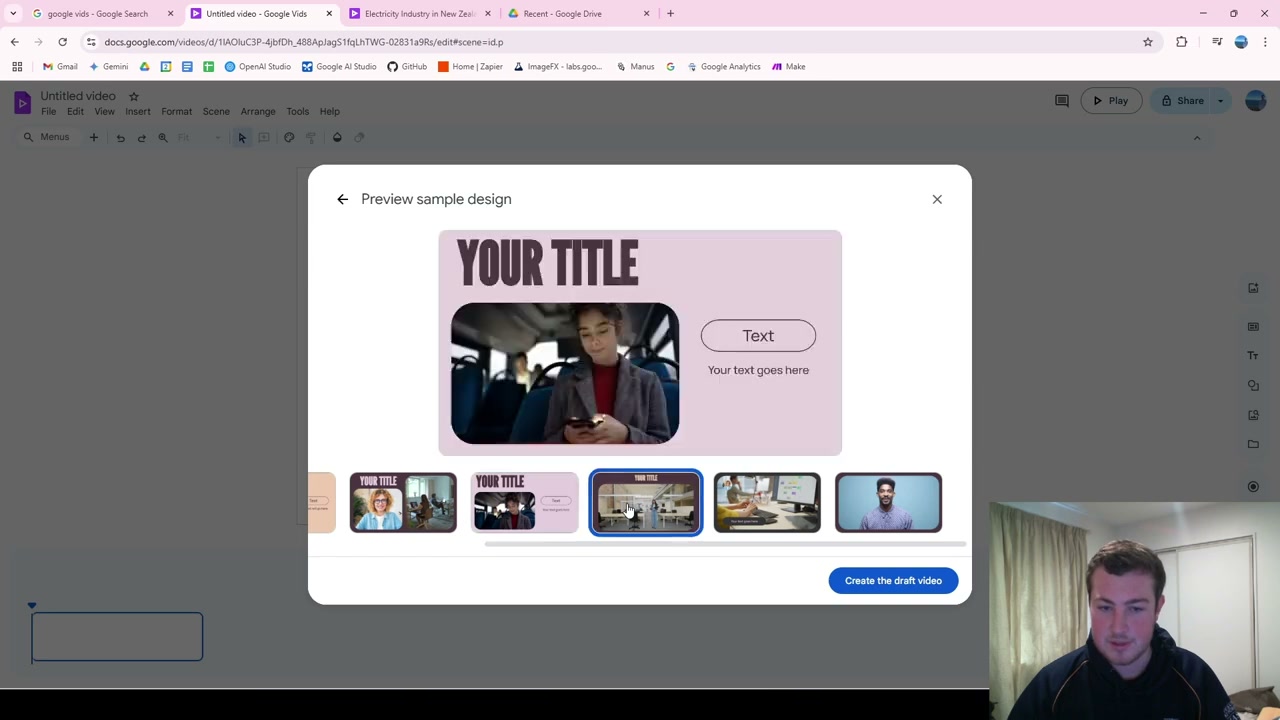
Next, select from an extensive library of templates. Each template has multiple design variations. Once you choose, click “Create draft video” and it generates voiceovers, video content, and animations in just a few seconds.
Customising Your Video
Each slide has an editable script. Change the text, then click “Generate the voiceover” to update it on the fly. You can change the narrator style too - teacher, educator, persuader, or narrator - depending on your use case.
Key customisation features include:
- Script editing: Modify text for any slide
- Voice regeneration: Update voiceover instantly
- Stock imagery: Browse or generate images for each slide
- Slide timing: Automatically adjusts to match audio length
- Brand colours: Change the entire slideshow colour scheme
Exporting Your Video
Once you’re done, export to Google Drive or download as MP4 and share wherever you need.
Final Thoughts
Google Vids is a huge time-saver for video presentations. It creates the entire template for you - scripts, voiceovers, stock footage, animations - and you only need to do the fine-tuning. This removes an enormous amount of time from manual presentation and video generation.